Defining the TX101 as a simple Step by Step sequencer is very reductive. The Moog 960 is a step by step sequecer, the TX101 is not. The latter is something more! Why? Simple, and now I'll explain it to you.
Il TX101 is a product developed by Audio Thing using KONTAKT (from version 4.2.4 onwards) as an engine.
It can be defined as a 4 + 2 track step by step sequencer (the reasons will be further explored later), whose look recalls that of the drum machine TR909 of Roland.
A sample (for a total of 16 samples) has been linked to each track which is controlled by an LPF filter (a filter similar to the one used in the MiniMoog). In addition, the 4 + 2 tracks are surrounded by a series of controls that make using the sequencer very intriguing, offering an immense range of sonic possibilities.
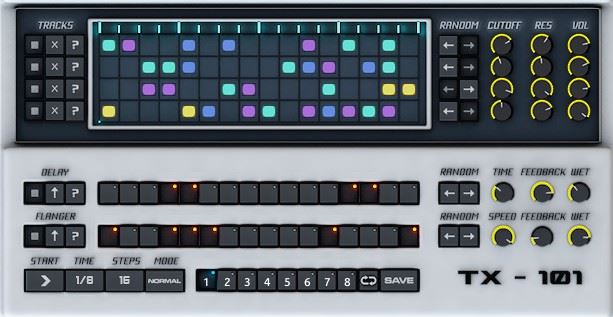
Opening KONTAKT and recalling the TX101 Master preset from the instrument subfolder, we will see a screen divided into two sections. The upper portion consists mainly of the sequencer matrix, with 16 steps per track.
The lower portion (the one that recalls the TR909) and the rest of the plugin, are made up of the classic controller buttons:
• eight memory buttons;
• a loop button;
• the classic SAVES button;
• question marks;
• some potentiometers for cutoff and resonance;
• a delay;
• a flangers;
• two columns, one above the other, of "random" buttons (which I think are the most interesting controls).
Play button
By starting the play button we will be able to appreciate the series of rhythmic impulses that create a sound environment, fascinating, rich in harmonics (a rather rare aspect for a drum machine), and above all a considerable number of different sounds that give the TX101 a human aspect. , certainly difficult to find in an electronic device, especially in software. It should be noted that we are not talking about Kick that "scrape" the coffers, or Claps that disturb the public peace. These are 16 samples chosen by the manufacturer, with extreme care, in order to better interact with the versatility of the TX101 parameters. What is most striking is the definition of the sound and the multiplicity of sound atmospheres created by the various parameters on a single sample.
Upper part analysis
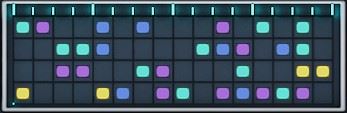
What draws attention is the matrix of points (16 in total) which is used for programming the 4 tracks:
• 4 traces;
• 16 step by track.
What constitutes the novelty of the TX101 are the buttons that are respectively located at the extreme left and at the extreme right of the tracks.
At the left end of each track are three buttons:
 Il first allows you to activate or deactivate the track. This is a classic PLAY / STOP. The according to completely reset the track. The third creates a random sequence that will be repeated constantly over time until another string of colors is created. It should be noted that for each trace, the matrix of points uses 4 values (represented by 4 colors) which correspond to 4 different samples.
The insertion of the values in the matrix of points is done in a canonical manner: click on the desired point (step) of the matrix several times until the desired color (and therefore the sample) is obtained. The absence of color instead determines the absence of sound.
At the right end of each track are two buttons:
 These are two arrows, pointing respectively to the right and to the left, which allow you to manage a very interesting function: RANDOM
 The left RANDOM arrow creates random sequences within the matrix, which will change automatically (no need to reuse the button) every time the string restarts from the beginning. The RANDOM arrow pointing to the right controls, always in a random way (exactly as seen for the left arrow) the value of the Cutoff, the Resonance and the Volume. To fully understand the function of this button it would be necessary to listen to the TX101 filter at work.
This filter has nothing to envy to the low pass filters (LPF) of other well-known manufacturers of music software. The Cutoff has a respectable range and, above all, at low levels it does not make the sound disappear, but emphasizes the low frequencies creating deep and full-bodied sounds. The resonance, on the other hand, has such an excursion as to create interesting sweep effects and combinations that are more reminiscent of the sounds of FM synthesis than that of an analog matrix.
Bottom part analysis
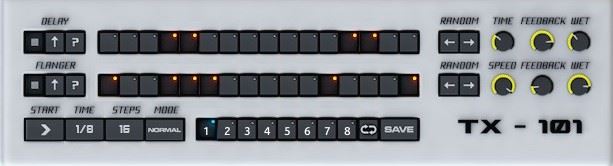
When we spoke of the TX101 as a 4 + 2 step by step sequencer, we were referring to the four tracks of the classic sequencer, plus two tracks that regulate two very interesting effects such as the delay and flangers. The presence of the 16 buttons (keys of ON / OFF) suggests that these effects can be regulated surgically, exactly as happens with the four canonical tracks. At the left end we find the track control buttons, identical to those placed on the left of the matrix. The only exception concerns the central button which indicates, with an arrow up or down, the simultaneous ON / OFF of all the buttons of the corresponding effect. On the far right are the RANDOM arrows, which perform the same functions as those located to the right of the matrix: the left arrow creates random sequences in the matrix of tracks, different each time the string restarts from the starting point; the right arrow controls the effect parameters:
• time or speed;
• feedback;
• the WET / DRY (amount of effect compared to the clean sound).
Why use 2 tracks for Delay and Flanger
Il Delay, when used effectively, it creates sonic variations which, in turn, provide another life to the original sample, thus creating very fascinating new sounds. The Delay Parameters have a range of use that allows them to be used as a simple echo, as a real sample delay, with very long intervals between one tap and another, or by bringing the taps closer together in order to create that effect typical of robotization. sound. The Flanger instead it allows to greatly emphasize the presence of the filter, giving it a breath that goes far beyond the simple use of the Cutoff or Resonance. According to a personal interpretation, it could be said that “where the filter stops, the Flanger begins”.
In the portion below we find the control buttons typical of a step sequencer

• the START / STOP;
• the speed of the dots in the matrix (from 1/8 to 1/32);
• the quantity of steps (from 4 to 16);
• The MODE key, which allows you to select three different types of execution:
1. NORMAL, in which the sequencer, at each interruption, resumes from the interruption point.
2. RETRIG, in which the sequencer, at each interruption, resumes from the interruption point.
3. HOST, in which the sequencer is driven by an external sequencer / DAW (Cubase, Pro Tools, Logic, etc.).
Finally we find the keys for storing 8 different patches, followed by the LOOP and SAVE keys.
Final houghts
In conclusion we can say that the TX101 is a 4-voice synth with multiple effects controlled by a step sequencer.
Its power lies in the fact that it was created by perfectly balancing the programming possibilities of the various parameters. This aspect, combined with a winning choice of samples, and an easy-to-use interface, allows us to create a myriad of sounds and rhythmic sequences that can be inserted in the most different musical contexts such as dance, dubstep, ambient music, l 'wildest hard core (in this regard I highly recommend applying a distortion to the TX101).
You are spoiled for choice!
AudioThing has created a plug-in capable of creating, practically in real time, a series of sounds and sequences of the highest quality, without falling into banal and kitch contexts, typical of recent times, and easily found.
USEFUL INFORMATION:
Producer: Audio Thing
Model: TX-101
Website: www.audiothing.net/instruments/tx-101
Cost: $ 18 ~ 13 €
Until next time
Fabio Badalamenti and Giancarlo LanzaDefining the TX101 as a simple Step by Step sequencer is very reductive. The Moog 960 is a step by step sequecer, the TX101 is not. The latter is something more! Why? Simple, and now I'll explain it to you.
Il TX101 is a product developed by Audio Thing using KONTAKT (from version 4.2.4 onwards) as an engine.
It can be defined as a step by step sequencer 4+2 tracks (the reasons for this will be explored further later), whose look is reminiscent of a drum machine TR909 of Roland.
A sample (for a total of 16 samples) has been linked to each track which is controlled by an LPF filter (a filter similar to the one used in the MiniMoog). In addition, the 4 + 2 tracks are surrounded by a series of controls that make using the sequencer very intriguing, offering an immense range of sonic possibilities.
Opening KONTAKT and recalling the TX101 Master preset from the instrument subfolder, we will see a screen divided into two sections. The upper portion consists mainly of the sequencer matrix, with 16 steps per track.
The lower portion (the one that recalls the TR909) and the rest of the plugin, are made up of the classic controller buttons:
• eight memory buttons;
• a loop button;
• the classic SAVES button;
• question marks;
• some potentiometers for cutoff and resonance;
• a delay;
• a flangers;
• two columns, one above the other, of "random" buttons (which I think are the most interesting controls).
Play button
By starting the button play We'll be able to appreciate the series of rhythmic pulses that create a fascinating soundscape, rich in harmonics (a rather rare feature for a drum machine), and above all a remarkable number of different sounds that give the TX101 a human feel, certainly difficult to find in an electronic device, much less in software. It's important to clarify that we're not talking about kicks that "shock" the speakers, or claps that disturb the peace. These are 16 samples chosen by the manufacturer with extreme care, in order to best interact with the versatility of the TX101's parameters. What's most striking is the definition of the sound and the multiplicity of sonic atmospheres created by the various parameters on a single sample.
Upper part analysis
What draws attention is the matrix of points (16 in total) which is used for programming the 4 tracks:
• 4 traces;
• 16 step by track.
What constitutes the novelty of the TX101 are the buttons that are respectively located at the extreme left and at the extreme right of the tracks.
At the left end of each track are three buttons:
Il first allows you to activate or deactivate the track. This is a classic PLAY / STOP. The according to completely reset the track. The third creates a random sequence that will be repeated constantly over time until another string of colors is created. It should be noted that for each trace, the matrix of points uses 4 values (represented by 4 colors) which correspond to 4 different samples.
The insertion of the values in the matrix of points is done in a canonical manner: click on the desired point (step) of the matrix several times until the desired color (and therefore the sample) is obtained. The absence of color instead determines the absence of sound.
At the right end of each track are two buttons:
These are two arrows, pointing respectively to the right and to the left, which allow you to manage a very interesting function: RANDOM
The left RANDOM arrow creates random sequences within the matrix, which will change automatically (no need to reuse the button) every time the string restarts from the beginning. The RANDOM arrow pointing to the right controls, always in a random way (exactly as seen for the left arrow) the value of the Cutoff, the Resonance and the Volume. To fully understand the function of this button it would be necessary to listen to the TX101 filter at work.
This filter has nothing to envy to the low pass filters (LPF) of other well-known manufacturers of music software. The Cutoff has a respectable range and, above all, at low levels it does not make the sound disappear, but emphasizes the low frequencies creating deep and full-bodied sounds. The resonance, on the other hand, has such an excursion as to create interesting sweep effects and combinations that are more reminiscent of the sounds of FM synthesis than that of an analog matrix.
Bottom part analysis
When we spoke of the TX101 as a 4 + 2 step by step sequencer, we were referring to the four tracks of the classic sequencer, plus two tracks that regulate two very interesting effects such as the delay and flangers. The presence of the 16 buttons (keys of ON / OFF) suggests that these effects can be regulated surgically, exactly as happens with the four canonical tracks. At the left end we find the track control buttons, identical to those placed on the left of the matrix. The only exception concerns the central button which indicates, with an arrow up or down, the simultaneous ON / OFF of all the buttons of the corresponding effect. On the far right are the RANDOM arrows, which perform the same functions as those located to the right of the matrix: the left arrow creates random sequences in the matrix of tracks, different each time the string restarts from the starting point; the right arrow controls the effect parameters:
• time or speed;
• feedback;
• the WET / DRY (amount of effect compared to the clean sound).
Why use 2 tracks for Delay and Flanger
Il Delay, when used effectively, it creates sonic variations which, in turn, provide another life to the original sample, thus creating very fascinating new sounds. The Delay Parameters have a range of use that allows them to be used as a simple echo, as a real sample delay, with very long intervals between one tap and another, or by bringing the taps closer together in order to create that effect typical of robotization. sound. The Flanger instead it allows to greatly emphasize the presence of the filter, giving it a breath that goes far beyond the simple use of the Cutoff or Resonance. According to a personal interpretation, it could be said that “where the filter stops, the Flanger begins”.
In the portion below we find the control buttons typical of a step sequencer
• the START / STOP;
• the speed of the dots in the matrix (from 1/8 to 1/32);
• the quantity of steps (from 4 to 16);
• The MODE key, which allows you to select three different types of execution:
1. NORMAL, in which the sequencer, at each interruption, resumes from the interruption point.
2. RETRIG, in which the sequencer, at each interruption, resumes from the interruption point.
3. HOST, in which the sequencer is driven by an external sequencer / DAW (Cubase, Pro Tools, Logic, etc.).
Finally we find the keys for storing 8 different patches, followed by the LOOP and SAVE keys.
Final houghts
In conclusion we can say that the TX101 is a 4-voice synth with multiple effects controlled by a step sequencer.
Its power lies in the fact that it was created by perfectly balancing the programming possibilities of the various parameters. This aspect, combined with a winning choice of samples, and an easy-to-use interface, allows us to create a myriad of sounds and rhythmic sequences that can be inserted in the most different musical contexts such as dance, dubstep, ambient music, l 'wildest hard core (in this regard I highly recommend applying a distortion to the TX101).
You are spoiled for choice!
AudioThing has created a plug-in capable of creating, practically in real time, a series of sounds and sequences of the highest quality, without falling into banal and kitch contexts, typical of recent times, and easily found.
USEFUL INFORMATION:
Producer: Audio Thing
Model: TX-101
Website: www.audiothing.net/instruments/tx-101
Cost: $ 18 ~ 13 €
Until next time
Fabio Badalamenti and Giancarlo LanzaCalling the TX101 a simple step-by-step sequencer is a bit of an understatement. The Moog 960 is a step-by-step sequencer, but the TX101 is not. The TX101 is something more! Why? It's simple, and I'll explain.
Il TX101 is a product developed by AudioThing using KONTAKT (from version 4.2.4 onwards) as an engine.
The look is reminiscent of a drum machine TR909Roland and if we really have to give it a definition, the TX101 is a 4+2 track step by step sequencer (I'll explain why later...), and each track has a sample linked to it (16 in total) which is controlled by an LPF filter (for the less informed, it is a filter similar to that of the MiniMoog).
Furthermore, the 4+2 tracks are surrounded by a series of controls that intrigue the use of the sequencers by offering an immense range of sonic possibilities.
We open KONTAKT, load the TX101 Master preset from the instruments subfolder, and a screen appears that could easily be divided into two parts. So far, nothing new.
The upper part features the sequencer matrix, with its 16 steps per track, and the lower part (the one that reminds us of the TR909) features the classic buttons for the controller, the eight memory buttons plus a loop button and the classic SAVES and if we widen our gaze a little we notice the presence of question marks, potentiometers, cut off, resonance, presents a delay and a flangers and what I find most interesting are the “random” buttons arranged in columns of two, one above the other.
And off we go with the PLAY!!!
We hear how he sings, and a series of rhythmic impulses start that create a fascinating sound environment, rich in harmonics (rare for a drum machine), and above all an avalanche of sounds that are always different from each other that give the TX101 a human aspect, difficult to find in an electronic device, let alone in a software.
It's important to point out that we're not talking about kicks that will rattle the speakers, or claps that will disturb the peace. These are samples (16 in total) carefully chosen by the manufacturer, specifically to interact best with the versatility of the TX101's parameters. What's striking is the definition of the sound and the multiplicity of sonic atmospheres created by the various parameters on a single sample!!!!
Analyzing the top
What catches your eye is the dot matrix (exactly 16) used to program the 4 tracks. So far, everything might seem normal!
4 Tracks
16 step by step
Nothing new. Where's the news? On the far left and the far right.
Each track has three buttons.
Il first from the left it allows you to activate or deactivate the track, a PLAY/STOP in short.
Il according to from left resets the track completely.
Il third from the left creates a random sequence that will be repeated constantly over time until another string of colors is created.
Speaking of colors, the dot matrix uses 4 values (represented by 4 colors) that start 4 different samples per track.
Entering values into the dot matrix is the classic way: you click on the desired point several times until you obtain the desired color or the absence of color which determines the absence of sound.
But when you move to the right and you get to the best!!!!!
There are two buttons with two arrows (one pointing to the right and one pointing to the left) and an interesting inscription above them: RANDOM….
What does this mean? The left arrow creates random sequences in the array that will change every time the string starts over! No need to reuse the button!
The Arrow pointing to the right instead controls, always in a random manner, the value of the Cutoff, the Resonance and the Volume exactly like its colleague on the left!!!!
To fully understand the function of this button, you need to hear the TX101 filter at work.
This filter is every bit as good as the low-pass filters (LPFs) found in other well-known music software brands. The cutoff has an enviable range, and most importantly, at low levels, it doesn't make the sound disappear but rather emphasizes the low frequencies, creating deep, full-bodied sounds. Meanwhile, the resonance has such a wide range that it creates interesting sweep effects or even strange combinations that are more reminiscent of FM synthesis sounds than analog ones.
Moving on to the part below
Remember when I asked you to be patient? Those who were kind enough to wait will now understand.
When we talked about 4+2, we meant the four tracks of the sequences plus 2 tracks that regulate two very interesting effects such as the delay and flag.
The 16 buttons make it immediately clear that the presence of these effects can be adjusted surgically just like the four tracks!!!!
In this case, it's about buttons ON / OFF, but the presence of the "famous random darts" should already make something clear...
At the far right we find the usual track control buttons, identical to those near the matrix, except for the center button, which indicates with an up or down arrow, the ON or OFF of all the buttons simultaneously.
Next, you'll notice the random arrows, which perform the same functions as those near the matrix. The left arrow creates random sequences in the track matrix, but they will always be different each time the string starts over. The right arrow controls the effect parameters, which are:
- The time
- The feedback
- The amount of effect compared to the clean sound (WET/DRY)
Why Delay and Flanger?
Il DelayWhen used effectively, the Delay creates sonic variations that, in turn, breathe new life into the original sample, creating other fascinating sounds. The Delay parameters have a wide range of uses, from simple echoes to full-blown sample delays, with extremely long intervals between taps, to the ability to create the typical robotic sound effect by moving the taps closer together.
Il Flanger Instead, it does nothing but emphasize the presence of the filter to the nth degree!
Giving it a breath of fresh air that goes far beyond simply using Cutoff or resonance.
One could interpret it as: where the filter stops, the flanger begins.
Continuing, immediately below we find the control buttons typical of a step sequencer
- The START/STOP
- The speed of the matrix dots (from 1/8 to 1/32)
- The number of steps (from 4 to 16)
- The MODE button allows us three types of execution:
i) NORMAL the sequencer reads the strings in the classic way, if we interrupt reading, when we restart it it will resume from where we stopped.
ii) RETRIG The sequencer will read the strings in the classic way, but if we interrupt reading, when we restart it it starts again from the first step.
iii) HOST The sequencer is driven by an external sequencer/DAW (Cubase, Pro Tools, Logic, etc.)
Then, you find the buttons to store 8 different patches followed by the loop button and the SAVE button.
In conclusion, the TX101 is actually a 4-voice synth plus effects controlled by one step sequencers .
Its power lies in the fact that it was masterfully crafted by AudioThing, perfectly balancing the programmable possibilities of the various parameters. This, combined with a winning selection of samples and an easy-to-use interface, allows us to create a myriad of sounds and rhythmic sequences that can be inserted into various contexts, from dance to dubstep, from ambient music to the most unbridled hardcore (try running the TX101 through a distortion box...). You're spoiled for choice! AudioThing has provided a plug-in capable of creating a series of high-quality sounds and sequences practically in real time, without falling into the banal or kitsch typical of these days, which is easily found.
USEFUL INFORMATION:
Producer: Audio Thing
Model: TX-101
Website: www.audiothing.net/instruments/tx-101
Cost: $ 18 ~ 13 €
Until next time
Fabio Badalamenti and Giancarlo Lanza