
23 years after the release of the FM synth par excellence, the very famous Yamaha DX7, and 5 years after the release of its perfect software clone, the Native Instruments FM7, the German company offers us an updated and enhanced version of the already excellent plug -in and could only call it “FM8”. Let's find out its potential, investigate the reason for a new version, let's try to understand if it's worth buying the update and, while we are, why not brush up on some old memories on the infamous frequency modulation synthesis?
Notes on FM synthesis
What many people don't know is that the DX7's frequency modulation synthesis (Fig.1) is actually a phase modulation. Let us consider the three fundamental elements of sound: frequency, amplitude and phase. If I have two oscillators, I can use one to generate the sound and another to modulate something of the first oscillator. If its frequency is modulated, that is, by increasing and decreasing it over time - for example with a sine wave - I obtain a modulation of frequency. A typical example is vibrato. But if I modulate, instead, the amplitude of the waveform, that is its volume, I rightly obtain the amplitude modulation, exactly as for the “tremolo” effect. What is almost impossible to do with acoustic instruments and analog synthesizers is modulating the phase, i.e. the horizontal position of the waveform with respect to the time axis. This is why the DX7 is a digital synth, that is for two fundamental reasons: first, because its oscillators, called "operators", exclusively generate the sine waveform and it is easier to create a sine wave even with the simplest DSP, rather than doing it with an electronic oscillator; second, because the modulation occurs on the phase and not on the frequency. In fact, the very first DX7 had some of the circuitry still analog, to be precise the envelopes. So why did they call it "frequency modulation"? Because, by altering the phase of a waveform, the auditory effect obtained is an alteration of the pitch of the note and the consequent addition or loss of harmonics, even reaching inharmonicity. The structure of the DX7 foresees the presence of six operators and different algorithms according to which these are linked together. In many algorithms there are also some feedbacks, that is operators able to modulate themselves. All this creates enormous flexibility capable of simulating virtually any imaginable timbre, but it also makes it very difficult to obtain a satisfying sound result from a simple idea, especially for those unfamiliar with programming digital synths.

The remake of the remake
The only "near perfect" software remake of the DX7 was the Native Instruments FM7 (Fig.2), officially released in 2001 and immediately became a must for all lovers of FM sounds. Not only was it able to import the original DX series presets and reproduce them perfectly, but it added many other new features, including the inevitable advantages of the world of virtual instruments: support for automation, LFO synchronization and delay to the music time, as well as programming skills, made easier thanks to an excellent graphic interface. This year Native Instruments wanted to perfect FM7 by bringing the latest innovations already implemented in its other products, among which we note a new graphical interface even clearer and cleaner, the new "KoreSound Browser" which allows the organization and immediate search of presets and the perfect integration with the Kore environment and, last but not least, the addition of new effects.

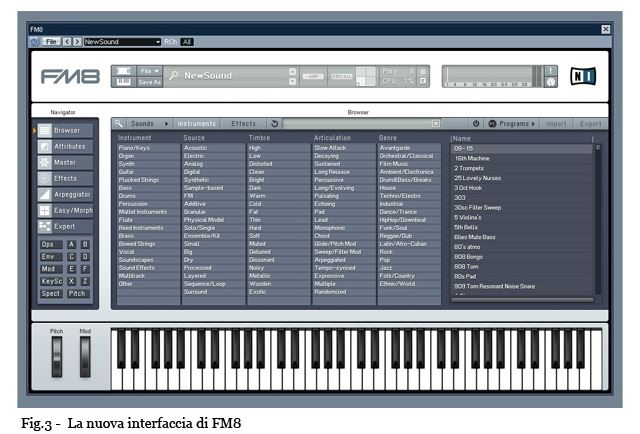
In the package we find the installation CD and a multilingual manual. The set-up is very fast and very easy. To unlock the software, the new “Service Center” system is used, a program that automatically downloads and installs updates and manages license keys. The available versions are stand-alone, VST, DXi and RTAS for Mac and Protools. The new interface has lost that DX7-style look in favor of better section organization. Watch out for (Fig.3): let's analyze the new graphics, where there is a division into three fundamental sections. The one at the top displays the name of the current preset and includes the keys to activate or deactivate the two sections at the bottom, allowing you to reduce the size of the interface; here we also find the keys for the quick management of loading and saving presets, an X / Y pad, the polyphony selector, the CPU usage indicator, a spectrum analyzer, vu-meter and various function keys . The section below shows the 61-key virtual keyboard and the pitch bend and modulation wheels. A bit like the layout of billions of websites, in FM8 we find the global menu on the right and the content of the pages in the center. At this point we just have to browse through the various pages to see what's beautiful. The first page, called “BROWSER”, is the first major innovation compared to the previous version. Here you can search for presets in several ways. First of all it must be said that each preset is associated with several attributes, including:
Instrument: establishes the main family of instruments to which the preset belongs;
Source: identifies mostly the nature of the instrument and / or the synthesis used to reproduce it;
Stamps: describes the timbre characteristic of the sound;
Articulation: expresses the sound impact on the basis of almost technical characteristics;
Genre: places the sound in certain musical genres.

In addition to these attributes, notes, the author's name, a numerical rating from 1 to 5 and other identification data can be associated with each preset. All this is visible on the “ATTRIBUTES” page. That said, we understand how easy it is to search for a preset from the thousands of units available, as well as those that can be purchased separately. If we prefer the old way, we can always enter the directory and scroll through the presets one at a time. And since the FM8 can also be used as an effects processor, a similar organization is also used for all on-board effects. We now pass to the MASTER page, shown in (Fig.4). Here we find the parameters for the classic section that is found in all synths: the general volume, the selection of polyphony, poly or mono modes, the unison and portamento settings, the transposition, the pitch parameters -bender and other miscellaneous things. In addition, on the right side is a list of all the assignments of various parameters to MIDI control changes.

And now let's move on to the EFFECTS page, (Fig.5). Here is the other big difference with FM7, the internal multi-effects section. Twelve excellent effects derived from the already ultra-proven sound engines of other Native products such as Guitar Rig: Overdrive, Tube Amp and Cabinet, with 10 different amp types; Shelving EQ, which is a good equalizer for leveling bass and treble; Peak EQ, a classic two-band parametric; modulation effects such as Talk Wah, Phaser, Flanger and Tremolo; and then the ambient effects, such as Reverb, Psyche Delay and a combined Chorus / Delay.
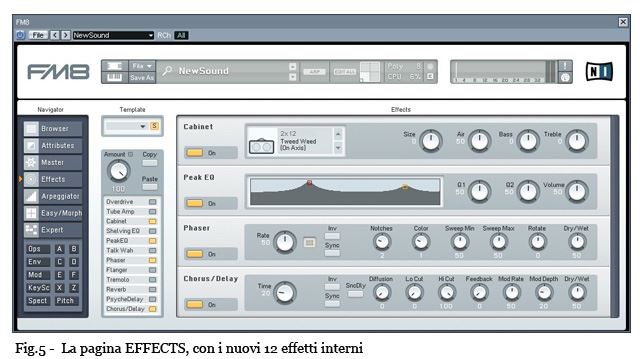
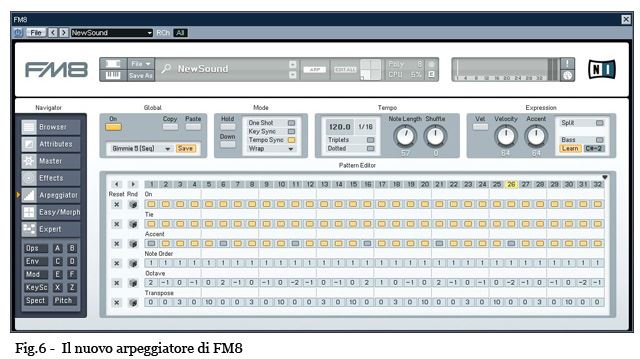
Effects already have a standard chain that cannot be changed, but all the internal multi-effects settings can be saved in dedicated memory slots. And now the third new feature of FM8: ARPEGGIATOR page, shown in (Fig.6). A simple arpeggiator up to 32 steps, very easy to program, with functions of random choice of values for each parameter and the possibility of memorizing phrases. So far it seems like an arpeggiator like many others, but what I have found particularly is the management of polyphony: many arpeggiators interpret multiple notes played on the keyboard as identical phrases to be played all together on different keys, but the FM8 arpeggiator offers more multiple ways of handling multiple sentences. An example: select the “Ambient Mallet” preset and play an A. Now set the Mode parameter to Ping and play an A and an B together, and then again A, B and A of the octave above, and hear how the phrase changes… beautiful!
EASY / MORPH page, (Fig.7). This page was also present in FM7 but with some small differences. Simplified parameters allow you to intervene on the timbre without necessarily having to go into the maze of FM programming, in short, an easy way to get your hands on a difficult instrument. In the Timbre section, five rotary controls allow you to modify the harmonic spectrum, brilliance, velocity response, detuning and the incidence of the envelopes.

We don't have to understand what this does technically, we just need to turn these knobs and hear how the sound changes. Furthermore, on the right side we find an X / Y pad for real-time morphing of some parameters. Each of the four boxes is set to affect a particular aspect of the sound, and a different pad effect is established for each preset. Let's move the mouse over this surface and hear what happens. If, on the other hand, we feel ready to get our hands on "carrier" and "modulator" operators, algorithms and feedback lines, then we click without delay on the EXPERT button and this time the interface becomes as represented in (Fig.8). As you can see, under the EXPERT writing there are other keys that are used to open the sub-pages. The letters from A to F are the classic six operators of the DX7, while X and Z are two additional operators, different from the others in that they also offer filters and other functions. The OPS button shows the general settings of all operators; ENV shows all envelopes, including the pitch envelope; MOD opens the fateful "modulation matrix", the one where all the modulating sources send the signal to the destinations to be modulated, in short, the area where there is a lot of fun (a bit like with all types of synthesizers, only here the what gets complicated squared!). KEYSC opens the “keyboard scaling” curves; SPECT shows the spectrum analyzers and finally, PITCH shows all options related to pitch. That nice grid that's always present on the right is the FM MATRIX, which works similarly to the classic modulation matrix. Here we can freely link the operators together without being limited, as was the case with the Yamaha DX, to the preset algorithms proposed by the manufacturer. In short, with a synth like that, the imagination has no limits! I don't go into it further because Native Instruments has already thought about writing the instruction manual, in addition to Yamaha 20 years ago, and in addition to the dozens of experts and scholars who have written entire treatises on FM, not counting the students who even they brought it as a thesis! Just know that FM8 is a very, very powerful plug-in, especially with a nice big sound, which you can hardly expect from a software instrument.

Conclusions
So is it worth the upgrade? Well, an answer to such a question can only be subjective. Those who already have FM7 know that it is an excellent plug-in and will have already had the opportunity to use it on many occasions, but they also know that from some points of view it is a bit limited, for example in the management of presets and above all for how much it concerns the internal effects. Those who just use it to simulate the DX7, to load the sysex of the original instrument, may not feel the need to upgrade. Those who have switched to KORE, or those who want to take advantage of the presence of the arpeggiator and all the new implementations, will understand that the 95 euros necessary for the update are money well spent. Among other things, I have not yet told you that FM8, unlike other software that implement FM synthesis, has a very slight impact on the CPU and requires very little space on the hard disk. And who still doesn't have FM8 or FM7 but wants an FM synth at all costs? Well, let's try to analyze the possible alternatives: you could look for a DX7 on the second-hand market, or a SY-77, a SY-99, an EXR-5, or a Motif with the PLG-150DX card, or even a TX81z, an TX802 (all Yamaha instruments successors to the DX7), but what if we don't have room for hardware and prefer a software solution? Well, you can start with a search on the net to come across a myriad of freeware plug-ins that are not even minimally comparable to FM8, or commercial software such as Sytrus of the Image Line or FMHeaven ... but none of these offer half of what FM8 has to offer. This is not to say that there is no choice, on the contrary, there is a choice, but if we want the best for our set-up then we must know how to choose the best. To the good connoisseur ...