A few months ago UVI, producer of sampled libraries, has released Falcon, which UVI itself defines as “Creative Hybrid Instrument”, under whose mantle hides a rather high-performance audio engine that is particularly attractive for the modern Sound Designer.

If you are “differently” young, you should remember the series PlugSound a few years ago, a suite of 6 SamplePlayers (Keyboards, Fretted, Drum & Percussion, Synth, Orchestral, General MIDI) which, in the face of a minimalist interface, returned highly respectable sounds, for the time, and widely used in many early millennium audio productions.
The audio engine behind these SamplePlayers was theUV Engine which, greatly improved and expanded over the years, we find today in Falcon.

It should be specified immediately: Falcon is not the umpteenth reproducer of samples like the various ones Contact (Native Instruments), Halion of Steinberg, MachFive of the MOTU. With 15 systems of different summaries, Falcon wants to try to rewrite the concept of virtual instruments, offering the user a modular system whose limit may be the user's knowledge of the various synthesis techniques known up to now. Similarly, it should be noted that both the audio engine and the Falcon interface fully reflect the peculiarities of MOTU MachFive3, whose base code is the UVI Engine. Those who have had to deal with MachFive 3 will therefore find no difficulty in operating on Falcon, although the latter has some more features, such as 3 new synthesis systems (IRCAM Multi Granular, IRCAM Scrubs e Wavetables). In addition Falcon can easily read the libraries of MOTU MachFive3, while it was not possible for me to do the opposite.
Falcon, in addition to the version standalone, is available for Windows e OSX, in various formats VST, Aax e Audio unit (OSX only).
Graphic interface (GUI)
Falcon presents itself with dark graphics, with a good contrast of the writings that recall menus and functions: some icons, activating operating modes related to them, are colored in light blue, further improving their visual impact. The dials of any parameter are also light blue in color, to which a pink dial is added, in case it is subjected to a modulating action. All shades of color are used only for some FX (Dual Delays e Spark Verb) and, at the user's discretion, the identification of the "Parts". All the programming windows are arranged with reasoning, so the expert user will have no difficulty in familiarizing us, while the neophyte will obviously need the necessary training to understand the complete structure. In any case, UVI immediately made available some videos of Falcon, in English, on the same page of the product, of which we propose the introductory one at the end of the article. This should allow you to have an even clearer idea of the software structure and the real potential of the various syntheses implemented.

In the main area, Falcon has different operating sections depending on whether you are operating in the mode Hand, Mixer o performace, which can be called up at the top of the interface. Also on this line, in addition to the selection of “Multi”, freely programmable by the user, we also find the general menu for saving / downloading presets or, again, recalling the Preferences; some buttons dedicated to Timing, to the General Volume, complete this section. The three display modes are well defined and allow the user to reach the desired programming section with a few clicks.

In order we have:
MAIN: the default one, has three sub-areas which, in turn, can display more programming sections, complementary to each other.
1) From left to right, we have a first column, with 3 submenus, with which to define the timbral setups (Parts), the hierarchical tree of how the selected sound is structured (Tree), or the list of all levels with the relative parameters (List), which exactly replicates the programming settings of the area Central edit (Tree and List allow you to operate comfortably and simultaneously on several levels: this aspect is useful when dealing with complex layering of sound. Ed).
2) The central area, intended for sound editing, is structured in 5 subsections (Info, Edit, Effects, Events e Mods). Edit, the main one shows the various levels in which the sound is structured.
Each Preset, assigned to a "Part", in fact it is a system of Chinese boxes in which the outermost element, called "Programme", Includes one or more"Layer", Each of which can have one or more"KeyGroup"Which, in turn, can manage one or more"Exciters". At this level, the user can draw on as many as 15 sound synthesis systems, even replicable (this means that the user, if desired, can add 3 "Analog Stacks", each consisting of up to 8 independent waveforms, with 3 FM modules and one or more sampled sounds. Ed). To complete this area, arranged in the lower part, we find the form "Mapping"Where to organize the Osc on the keyboard in layer/split, and the form "Modulation”Which, as the name suggests, aggregates how many modulations it wants to activate on any of the parameters that are part of the entire synthesis chain. Please note that one or more can be assigned to each level FX among the over 80 available. Finally, considering that up to 64 Parts, each with its own Midi channel, can be part of a "Multi”, The usage limit of Falcon is dictated only by the power of the computer and / or the patience / competence of the user.
3) on the right, finally, we find the area "Web Browser“, Entirely new compared to MachFive3, where they are organized, on well 6 submenus, both the libraries and the programming elements that are part of the Falcon core: Oscillator, FX, MultiFX, Event processors (Including Arpeggiators e Script) to Modulation Source (including a Multi and one Step Envelope, in addition to the classics ADSR, DAHDSR e LFO). FX, Event Processor and Modulation Source can be applied, in different ways, to the levels foreseen by the synthesis chain. From the browser you operate with simple drag and drop.
MIXER: every Parts and accessories has in this area its own classic audio channel complete with Insertion e Send FX. The mixer then provides 4 Aux channels and Master channel. Management is simple and immediate. The FX available, replicated compared to those used for the programming sections, should not be underestimated: Delay, Reverbs (including SparkVerb), Filters, Gate, compressors, analysis processors, Distortionists, etc. they are all present with a lot of specific programming parameters and the possibility of subjecting them to any modulation, as happens for the synthesis modules.

Perf: all the Parts and accessories they are displayed in single lines where, for each one, it is possible to quickly fix Volume, Bread, General intonation (octaves and semitones), audio output (Main or 16 individual), the MIDI channel, Mute, Only, Split e Layer keyboard and any KeySwitch. Regarding the latter, I would have liked to have seen them in other areas as well. Furthermore, consider that by standardizing the MIDI receive channels, that is, by setting them all in the same way, it is possible to create very powerful timbre overlays (layers) and keyboard divisions (splits) and, theoretically, "without limits" as already happens with the Combi, Multi, Performance present on hardware workstation. These programs, especially useful for live performances, can be saved as MULTI.
Synthesis models
It was said at the beginning that Falcon, according to UVI a "Creative Hybrid Instrument", can be considered a real "Virtual Modular Synths". The 15 types of Oscillators, divided into Synthesis e Sampling, range from Virtual analog to the FM, WaveTables, until the use of the granular synthesis or the slicing, thanks to a strong contribution from IRCAM, in fact the most advanced center for the study and manipulation of sound. For this reason, Falcon is rightfully a candidate to be evaluated also as a tool for teaching aimed at electronic music, both at high school and conservatory level.
Leaving aside the more usual aspects, as regards the Sampling, we find:
IRCAM Granular e Multi Granular: modules dedicated to granular synthesis in which the waveform is broken up into very short audio fragments (called grains), then recompiled together to give life to completely different sounds from the original. With the Multi module you have the option to generate up to 8 entries, each with a different excursus of the reading of the grains.
IRCAM Scrubs: similar in behavior to granular IRCAM, it performs a casual reading of the grains, with control of speed e direction. For analysis, it uses the same algorithms as IRCAM Stretch.
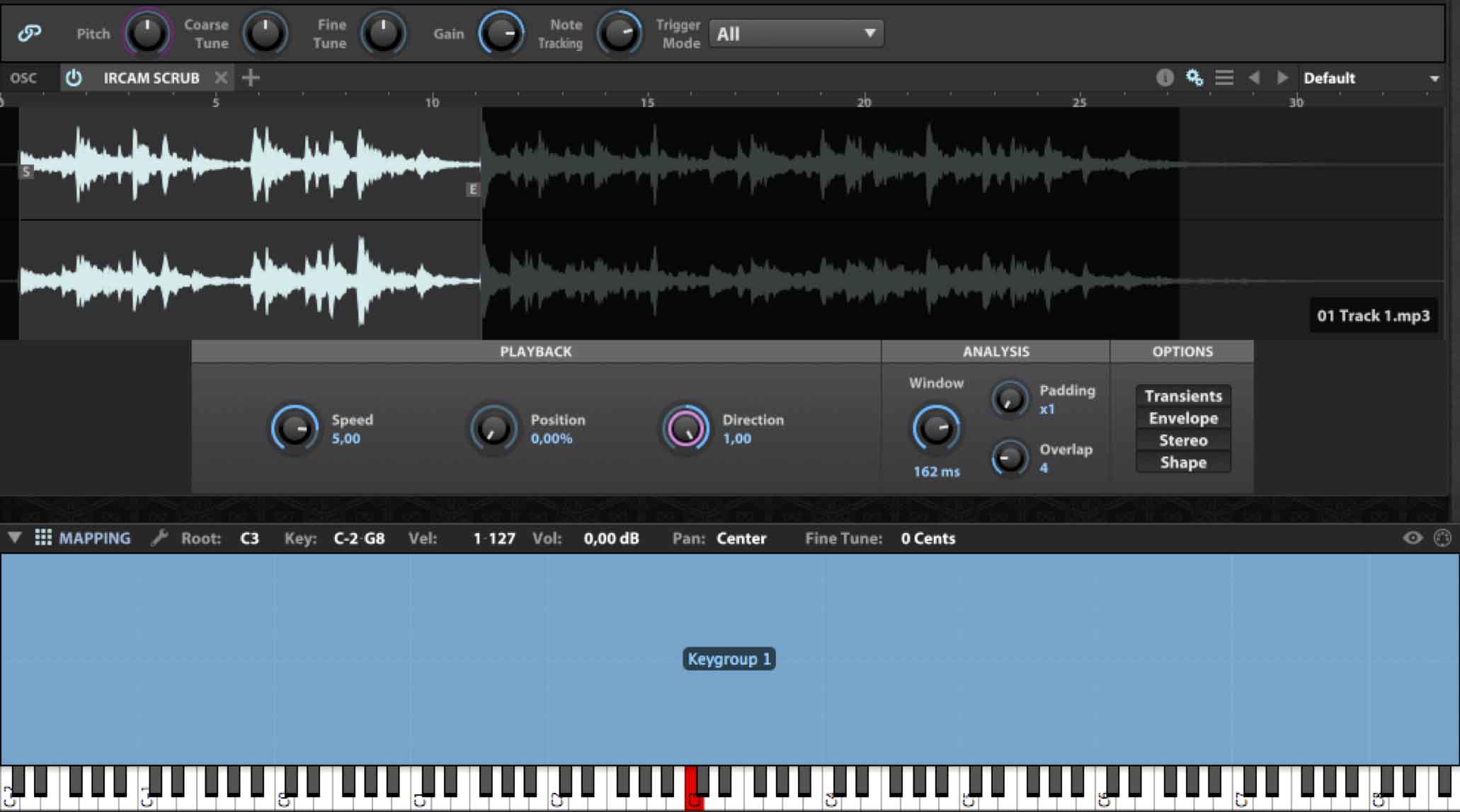
IRCAM Stretch: compared to the other module uses a Phase Vocoder high performance to safeguard transients ed envelopes of the audio signal, with obvious repercussions on the computer CPU. It is recommended for very complex audio materials where this type of calculation makes sense to be employed.
Sampler: simple champion player with different interpolation algorithms of the audio signal aimed at its transposition.
Slice: as can be guessed, it allows the fragmentation of a loop or other timing based waveform to then be able to export the result to the DAW or by assigning the individual slices to a keyboard.
Stretch: similar to the previous one, but with lighter analysis algorithms.
While for the Synthesis, we have:
Analog: Classic analog style oscillator with 6 waveforms (Saw, Triangle, Square, Sine, Press, Noise), complete with PWM, HardSync e Unison until 8 entries.
Analog stacks: groups 8 "mini" oscillators, which can be activated individually, clearly derived from the previous module, which lacks theHardSync, while the 'Unisonobviously, it will be possible to generate it with appropriate detuning of the individual oscillators.
Drum: combines an oscillator in tune with a noise generator, Complete with envelope AD dedicated and balance control between the two. A Master section, in which there is, among other things, a simple EQ control, completes this module.
FM: 4 operators with 11 different algorithms, Complete with Feedback applicable to the last operator, they return the classic style sounds DXseries.
Noise: oscillator containing well 15 different noise sounds, including the classics White e Pink. A neighboring and dynamic parameter, which changes meaning according to the recalled noise, can modulate its sound content.
Organ: comprised of 9 classic drawbars, with individual Pan, and module for adding any initial percussion.
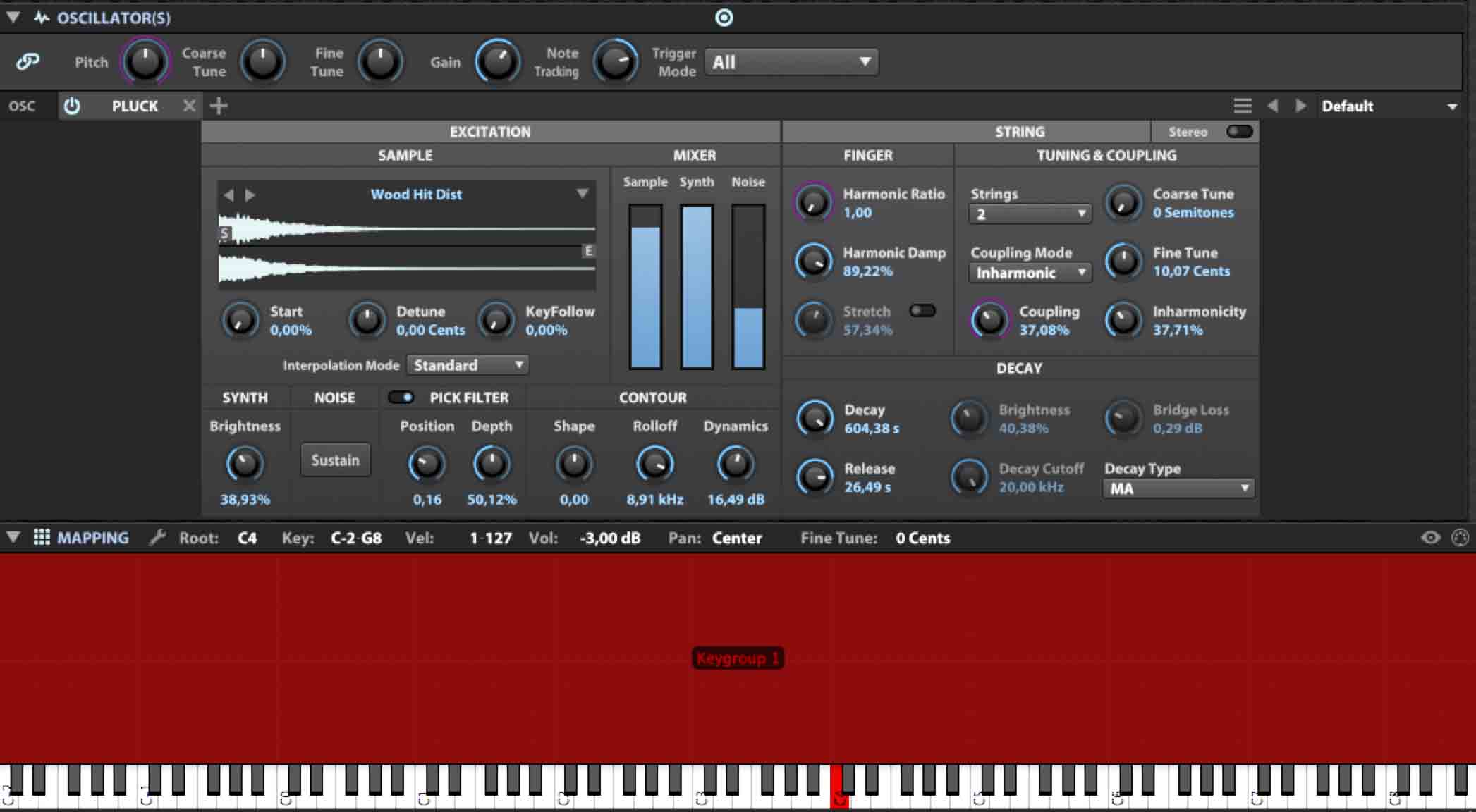
pluck: inspired by synthesis Karplus-Strong, is a module that uses sampled algorithms and exciters, giving back quite unusual sounds. You can import your own waveforms.
WaveTables: it can manage, in addition to the internal ones, personal waveforms, single or in sequence, as well as add a unison effect up to 8 entries. To the more experienced it is clear that with an appropriate modulation, LFO first of all, this oscillator can return very dynamic and varied sounds in the harmonic content.
In short
We could still talk a lot about Falcon, given its nature multi synthesis. Having to lighten this article, it is worth mentioning briefly that:
- can import various audio formats (including AIFF, FLAC, MP3, Rex1, Rex2, SDII, WAV, WAV64, SFZ, SND, CAF);
- allows you to customize your libraries with specific scripts, in case you want to direct you to the activity of sound designer;
- manages several MIDI event processors, including a very elaborate one Arpeggiator, an harmonizer and a MIDI file player
- allows the programming of Macro Controls addressable to any parameter;
- manages Sampling Frequencies up 192KHz;
- allows you to configure the audio outputs from Suit up to Surround 10.2, as long as your sound card allows it;
Finally, a separate article could be dedicated to FX, with particular reference to SparkVerb, which UVI also develops in a separate version as FX plugin, or the Dual Delay, from which the ReLayer plugin, also developed separately.

Libraries and Bonuses
Falcon includes a library of approx 600 MegaByte of samples, in the proprietary format .ufs, which give access to hundreds of sounds, almost all electronic and EDM oriented. Despite the multisynthetic hybrid nature (remember that the Falcon sound is not related to sampled sounds at all), I would not have minded having a few more sampled libraries (there are actually no acoustic sounds and at the moment it does not allow conversion from other formats) , perhaps reduced compared to those produced by UVI itself, which could highlight the peculiarities of Falcon also from this point of view.
However, with the purchase of Falcon, UVI gives away a $ 100 voucher to be used for the purchase of libraries. Among these, I think the sampled libraries that replicate vintage instruments such as the Synclavier, Fairlight, EMU I e II, (all present in the Vintage Vault bundle. ed).
Summing up
Falcon was born already mature and with many arrows in his bow. Although the accompanying libraries are noteworthy, it is clearly not a tool to be limited to the simple call of Preset. With sufficient knowledge of sound synthesis systems, even starting from scratch, you can quickly get a lot of gods low acids, thanks to the analog modules, as much as the bell-like sounds in full compliance with FM, or drones and enveloping soundscapes rather than pizzicato-style sounds or organ emulations: without considering the entire Sample Player section, to be evaluated as a "sound alternative" to the various EXS24, Contact, Halion, etc. In this regard, it should be remembered that UVI itself produces special libraries, many of which are EDM oriented, as well as of course Orchestral sections, Mellotron, Rhodes emulations, etc. as well as unusual libraries such as the Prepared Plan, developed by IRCAM. And if this is not enough, on the same UVI site a special page refers you to all third parties that develop tools specifically based onUV Engine.
If it is really necessary to note discrepancies, this must be ascribed to the fact that, by activating different modulations on different levels, the whole thing begins to be confused: it would be enough for the different modulation sources to have different colors for everything to work better.
Last hour
A few days ago the version 1.1 Falcon, free, which adds new features to the FM and Pluck oscillators, new effects, including an 8-voice Chorus, over a hundred new Presets, and support for controllers Roli Seaboard e LinnInstrument.

Anyone who thinks that being a Sound Designer means only producing sounds will change their minds with the latest free news from UVI: a brilliant script has allowed UVI programmers to reformulate in a Falcon key, the acclaimed Space Invaders from the 80s, here renamed Spark Invaders and available on the home page of the site UVI.
To conclude, Spark Invaders, like other sampled library demos are usable with UVIWS, free player available at the bottom of the same site.
Introductory Video

*Multi-synthesis hybrid system (15 types of oscillators);
*Wide possibilities of modulation;
* Performance and Multi;
*Mixer and FX.

*No acoustic library;
*Modulation management in the somewhat chaotic Edit window;
* A little high cost.
Link: www.uvi.net
Good music everyone!
Alfred CapozziUVI, sample library and software developer, has released Falcon over the past few months. UVI calls it “Creative Hybrid Instrument” and under its cloak it hides a pretty powerful audio engine and particularly attractive for the Modern Sound Designer.
If you are not so young, you should remember the PlugSound series a few years ago, a suite of 6 sample players (Keyboards, Fretted, Drum & Percussion, Synth, Orchestral, General MIDI) that, with a minimalist interface, provided respectable sounds, for its time, and were widely used in many audio productions of the millennium.
The audio engine behind these sample players was the UVI Engine that significantly improved and extended over the years, found today in Falcon.
Please note in advance that Falcon is not the other sample player like the various Contact (Native Instruments), Steinberg's Halion, MOTU's MachFive. With 15 different synthesis systems, Falcon rewrites the concept of virtual instrument, providing the user with a modular system whose limit may just be the user's knowledge about the various synthesis techniques known until today.
Similarly, notice that both the audio engine and the interface of Falcon fully mimic the peculiarities of MOTU MachFive3, whose basic code is just the UVI Engine. If you had to deal with MachFive 3, you will find no difficulty in operating on Falcon, although the latter has some more features, such as 3 new synthetic systems (IRCAM Multi Granular, IRCAM Scrubs and Wavetables). Moreover Falcon can easily read MOTU MachFive3 libraries, while it was not possible to do the opposite.
Falcon, in addition to the standalone version, is available for Windows and OSX, in the various VST, Aax and Audio unit (OSX only) formats.
Graphical User Interface (GUI)
Falcon comes with a dark graphics, with a good text contrast that recall menus and functions: some icons, enabling operating modes, are light blue colored further enhancing the visual impact. Also the parameter rings are light blue, a pink ring is added in case the same parameter is subjected to modulation. Other colors are used only for some FX (Dual Delays and Spark Verb) and, at the user's discretion, for the identification of “Parts”. All programming windows are arranged with common sense, the experienced user will have no difficulty to familiarize, while the novice will obviously need some practice to understand the complete structure. Anyway, the UVI made immediately available some videos of Falcon, in English, on the same product page. The introduction video is presented at the end of the article. This should allow you to have a clearer idea of the software structure and the real potential of the different implemented synthesis.
In the main area, Falcon has different operational sections depending on whether it operates in Main, Mixer or Performance mode, which can be recalled in the top of the interface. Always on this line, in addition to the selection of the “Multi”, freely programmable by user, we also find the general menu to save / download the presets or Preferences; some buttons, dedicated to the timing, the general volume, complete this section. The three display modes are well defined and allow the user to reach the desired programming section with a few clicks.
In order we have:
MAIN: the default one, which has three sub-areas, that in turn can display more programming sections, complementary to each other.
1) From left to right, we have a first column, with 3 sub-menus, which define Parts (timbral setup), the hierarchical tree structure of the selected sound (Tree) or a list of levels with their parameters (List), which exactly replicates the programming settings of the central Edit area (Tree and List settings allow you to work comfortably and simultaneously on several levels: an aspect which comes in handy when dealing with complex layers)
2) The central area, destined for sound editing, is divided into 5 subsections (Info, Edit, Effects, Events and Mods). Edit, the main area, shows the various levels at which the sound is structured.
Each preset, assigned to a “Part”, is in fact a system of Chinese boxes in which the outermost element, called “Program”, encompasses one or more “Layer”, each of which may have one or more “Keygroups” that, in turn, can manage one or more “Oscillators”. At this level, the user can tap into as many as 15 sound synthesis systems, also replicable (it means that the user can add 3 “Analog Stack”, each consisting of up to 8 independent waveforms, with 3 FM modules and one or more sample sounds). To complete this area, arranged at the bottom, we find the form “Mapping” to organize the Osc on the keyboard layer / split, and the “Modulation” module which, as the name hints at, aggregates as many modulations as you want to enable any parameters that are part of the entire synthesis chain. It should be taken into account, then, that at every level, you can assign one or more FX among more than 80 available. Finally, considering that up to 64 Parts, each with its own Midi channel, may be part of a “Multi”, Falcon use is limited only by the power of the computer and / or the user's patience / competence.
3) To the right, finally, we find the “Browser” area, entirely new compared to MachFive3, where they are organized, on 6 submenus, both libraries and programming elements that are part of the core of Falcon: Oscillator, FX, Multi FX, Event Processor (including Arpeggiators and Script) and Modulation Source (including a Multi and a Step Envelope, besides the classical ADSR, LFO and DAHDSR). FX, Event Processor and Modulation Source can be applied in a different way, to the levels required by the synthesis chain. The browser will work with simple drag and drop.
MIXER: every Parts in this area has its own classical style audio channel with an Insert and Send FX. The mixer provides 4 Aux channels and Master channel. The management is simple and immediate. The FX available, similar to those used in the programming sections, are not to be underestimated: Delay, Reverb (including SparkVerb), Filters, Gate, Compressor, analysis processors, distortions, etc. They are all present with many specific programming parameters and the possibility of using the same with any modulation, as is the case for the synthesis modules.
Perf: all Parts are displayed in individual rows where, for each one, you can quickly set Volume, Pan, General Intonation (octaves and semitones), audio output (Main or 16 individual), MIDI channel, Mute, Solo, Split and Layer of keyboard and any keyswitch. Regarding the latter, I would have liked to find them also in the other areas. Consider also, that setting the MIDI reception channels with the same value, it is possible to create very powerful timbre overlaps (layers) and keyboard divisions (split) and, theoretically, “unlimited” the same way as already happens with the Combi, Multi, Performance present on the hardware workstation. Such programs, especially useful for live performances, can be saved as MULTI.
Synthesis models
I said earlier that Falcon, as UVI calls it “Creative Hybrid Instrument”, can be considered a real “Virtual Modular Synth”. The 15 types of oscillators, divided in Synthesis and Sampling, range from Virtual Analog to the FM, to the WaveTable, through to the use of granular synthesis or slicing, thanks to a strong contribution of IRCAM, the most advanced center for the study and manipulation of the sound. For this reason, Falcon is a candidate with good reason to be evaluated
as a tool for teaching electronic music, both at high school and conservatoire level.
Leaving aside the more usual aspects, with regard to the Sampling, we find:
– IRCAM Granular and Multi Granular: modules dedicated to granular synthesis in which the waveform is broken up into short audio fragments (called grains), then recombined with each other to create sounds completely different from the original. With the Multi module you can generate up to 8 voices, each with a different overview of the grains reading.
– IRCAM Scrub: similar in behavior to IRCAM granular, it randomly plays grains, with speed and direction control. For the analysis, it uses the same IRCAM Stretch algorithms.
IRCAM Stretch: respect to the other module it uses a high-performance Phase Vocoder to preserve transients and envelopes of the audio signal, with obvious consequences on the computer's CPU. It is recommended for very complex audio material, where this type of calculation makes sense to be employed.
Sampler: simple sample player with different interpolation algorithms of the audio signal aimed at the transposition of the same.
Slice: allows the fragmentation of a loop or other form of timing based wave. The result can be exported to the DAW or assigned the individual slices of a keyboard.
Stretch: similar to the previous one, but with lighter analysis algorithms.
While for the Synthesis, we have:
Analog: classic analog style oscillator with 6 waveforms (Saw, Triangle, Square, Sine, Pulse, Noise), complete with a PWM, and Unison HardSync up to 8 entries.
Analog stack: group of 8 “mini” oscillators, which can be activated individually, clearly derived from the previous module, which lacks the HardSync, while the Unison, of course, can be created with the appropriate detuning of individual oscillators.
Drum: puts together tuned oscillator with a noise generator, complete with a dedicated AD envelope and balance control between the two. A Master section, where it is present and a simple EQ control, complete this module.
– FM: 4 operators with 11 different algorithms, with lots of feedback applicable to the last operator, return the classic sounds in DX series style.
Noise: noise oscillator contains as many as 15 different sounds including classic White and Pink. A modulation can be added with a dynamic parameter, that changes meaning depending on the selected noise.
Organ: consists of 9 classic drawbars, with individual Pan, and module to add any initial percussion.
– Pluck: inspired to Karplus-Strong synthesis, is a module that employs algorithms and sample based exciters, returning quite unusual sounds. You can import your waveforms.
WaveTables: can manage not only the internal, but also personal waveforms, single or in sequence,
And it can add an unison effect up to 8 entries. To experts it is clear that with a suitable modulation, LFO first, this oscillator can return dynamic and rich harmonic content sounds.
In shorts
I might tell you more about Falcon, given its multi synthesis nature. Having to read this article, it is worth briefly mentioning the fact that:
– You can import multiple audio formats (including AIFF, FLAC, MP3, rex1, Rex2, SDII, WAV, WAV64 SFZ, SND, CAF);
– It allows you to customize your own libraries with specific scripts, in case you want to do the activity of Sound Designer;
– Handles several processors of MIDI events, including a pretty Arpeggiator, a harmonizer and a MIDI File Player
– Allows programming of Macro Controls with any parameter;
– Manages up to 192KHz sampling rates;
– Allows you to configure the audio outputs from Mono to Surround 10.2, provided that your sound card allows;
A separate article, finally, could be dedicated to FX, with particular reference to SparkVerb, the UVI also develops a separate FX plugin version, or Dual Delay, that inspired the Relayer plugin, also developed separately.
Libraries and Bonus
Falcon includes a library of about 600 megabytes of samples, in the proprietary .ufs format, giving access to hundreds of sounds, almost all electronic and EDM oriented. Despite the hybrid multisynthesis nature (remember that the Falcon sound is not at all related to sampled sounds), I would not mind having some more sample libraries (lacking in fact acoustic sounds and at the moment does not allow conversion from other formats) maybe reduced compared to those produced by the same UVI, that could highlight the peculiarities of Falcon also from this point of view.
However, with the purchase of Falcon, the UVI offers a $100 voucher to be used to purchase additional libraries. Among them, I think they are worthy of note above all sample libraries that replicate vintage instruments like Synclavier, the Fairlight, EMU I and II, (all present in the bundle Vintage Vault. Ed).
Summary
Falcon is born already mature, with many arrows to his bow. Although the supplied libraries are notable, of course, it is not a tool to be limited to simple recall of presets. With sufficient knowledge of sound synthesis systems, even starting from scratch, you can achieve in short time as many acid basses, thanks to the analog modules, as bell FM sound, or drones and soundscape rather than “pizzicato” sound or organ emulations without considering the whole section Sample Player, to be assessed as “sound alternative” to the various EXS24, Contact, Halion, etc. It is worth remembering that the same UVI produces special libraries, many of which EDM oriented, and of course Orchestral sections, Mellotron emulations, Rhodes, etc. as well as unusual libraries could be the Prepared Plan, developed by the IRCAM. And if this were not enough, on the same UVI web site, a special page will refer to all third parties who develop tools specifically based on the UV Engine.
If you really need to make a note of the discrepancies, this should be ascribed to the fact that, by activating different modulations on different levels, you start to confuse the whole: it would be enough that the different modulation sources have different colors so that everything can work better breaking news.
A few days ago it was released the 1.1 version of the Falcon, free, which adds new features to oscillators FM and Pluck, new effects, including an 8 voice Chorus, over a hundred new presets, and support for Roli Seaboard and Linn Instrument controllers.
Who then thinks that being a Sound Designer means only produces sound, will change their mind with the latest news of the free UVI: a brilliant script has in fact allowed the UVI programmers to reformulate the acclaimed Space Invaders 80s, here renamed Spark Invaders, and available on the UVI home page.
To conclude, Spark Invaders, like other demos of the sample libraries can be used with UVIWS, free player available at the bottom side of the same site.
Introduction video
* System Multi synthesis (15 types of oscillators);
*Wide modulation range;
Section Performance and Multi;
*Mixer and FX.
*Nothing acoustic sound's library;
*Management of modulations in the Edit window a little chaotic;
*
A little expensive.
Link: www.uvi.net
Italian to English translation:Umberto Sorbo