




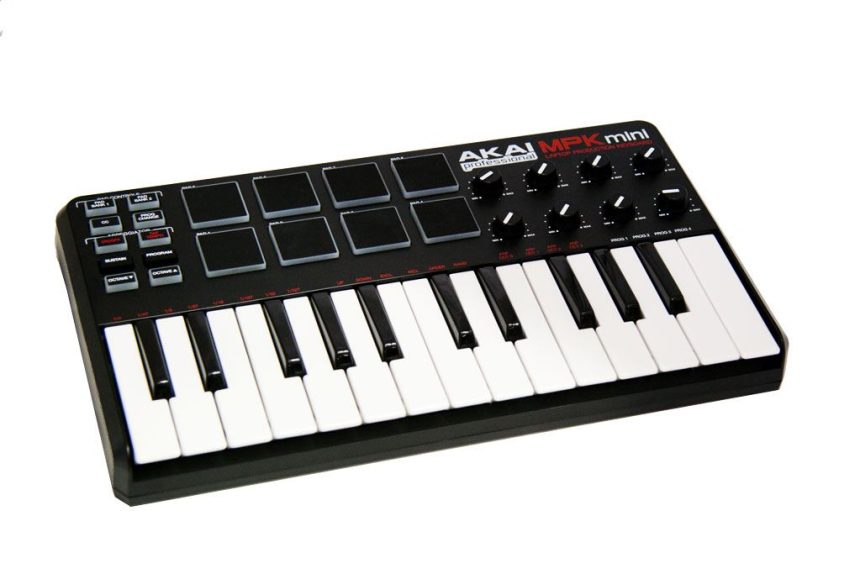
The AKAI MPK Mini is a controller born from the merger of two previous AKAI products, the LPK25 and the LPD8. We have 25 mini keys, 8 pads, 8 knobs, arpeggiator and other functions available, all condensed into an instrument just over 30 cm long, perfect to combine with a laptop (hence the slogan "Laptop Production Keyboard") or from use in confined spaces without sacrificing AKAI quality.

CONFEZIONE
The packaging is very simple, together with the controller we find the USB cable, the CD with the manual in PDF format and the editor for OSX / Windows, the instructions for safety and warranty and a coupon to get a discount on Ableton Live o Ableton Suite. We shot a short video to show you the AKAI MPK mini un-boxing, you can see it below:
USE
We tested the product on both PC with Windows 7 both on an iMAC with OS X Snow Leopard without encountering any problems, using mostly two Native Instruments software: Massive and Kontakt. Simply connect the USB cable to your computer and within seconds, without installing additional drivers, the MPK mini is ready to send MIDI signals to your trusted sequencer / DAW. Being a connector mini-USB like most of the small controllers (to be clear, like the Nano series by Korg) it is advisable to be careful not to force the entry or to prevent any bumps that could damage this type of connector. During the test, and in the following days of use, neither hardware nor software functional problems were found.

The keys, although mini, they are very good and allow you to play without too many impediments. Despite the price, they have nothing to do with budget mini-keys; the action is very good, the only flaw is the dynamic response in the velocity range 0-40 which presents some abrupt leaps, but all in all leaves very satisfied.

I pad, on the other hand, they are definitely excellent. The dynamic response is very good and there is no risk of accidentally pressing them as happens with too soft cheap pads. Note that the edges of each pad light up red when operated, probably more for an aesthetic reason than for actual utility.

The knobs (clearly not continuously running, i.e. not encoder) are neither too hard nor too soft. Despite the size they are well spaced and the virtuosos of the potentiometers can try their hand at controlling two together with one hand without excessive difficulty. If you want to be very picky, the numbering under the knobs is missing (which is instead present for the pads).
FUNCTIONS

On the left edge they are present 10 buttons to access various functions. From the bottom, in addition to the classic octave up and down, to move the range of octaves that are played, we find a Sustain button (which acts as a substitute for a sustain pedal) and a Program button that is used to recall 4 general presets of the 'MPK mini (selectable by holding down the Program button together with one or the keys labeled Prog 1-4, from A to C of the second octave). Each preset corresponds to a different CC / NOTE assignment of the pads and knobs. The presets can be easily modified using the editor on the CD or can be downloaded directly from the AKAI website.
Further up we find two buttons to control the arpeggiator, in my opinion very useful function for such a controller. The On / Off button, in addition to activating and deactivating the arpeggiator, can be used to select (by holding it down) different arpeggiator functions (as for the presets / programs, just look at the label corresponding to the keys): the relative speed of the arpeggiator expressed in values such as 1/4, 1/8, 1/16…, the arpeggio execution mode as Up ((upward), Down (downward), inclusive (from the bottom up, repeating the notes), Exclusive (up and down without repeating), Random (random order of the notes pressed), Order (the exact order in which the notes were pressed) and it is also possible to choose for how many octaves to spread the arpeggio with the keys labeled ARP OCT 0-3. Alongside we also find a button for the TAP TIME arpeggiator which will be disabled if from the editor you choose to synchronize the tempo of the MPK mini with the tempo of a host such as a sequencer or DAW.
EDITOR

The editor is quite simple to use to customize the MIDI signals sent by the knobs / pads. The small manual on the CD (or downloadable from the AKAI website) quickly explains its use which is quite intuitive. It must be said, however, that by now most of the virtual instruments on the market offer the possibility of exploiting the MIDI Learn (the ability to assign a MIDI CC from the controller to the parameter of the virtual instrument or effect) and therefore the use of the editor may be superfluous for most uses rapid knobs.
PROJECTED IMPACT
Pro: Good quality / price ratio, very good controls, compact and simple to use
Against: There is no control for pitch bending, the dynamic response of the keys in the 0-40 velocity range is not accurate
INFORMATION
Producer: akai
Model: MPK Mini
website: http://www.akaipro.com/mpkmini
Photos: Paul Colacicco


