




Often the average user of a music software acquires the knowledge of a DAW, an audio effect or a synth, through the direct and practical use of the software or by mediating, just as often, the indications that friends or other users provide. This means that, in most cases, the vast majority of functions that could optimize, improve, and speed up the operational workflow remain unknown. So why not rely on a specific Video Course?

On the international scene, there are several companies that deal with Video Tutorial: AskVideo, MacProVideo, groove 3, are just some of the companies that base their business existence on courses dedicated to audio software, obviously in English.
The YouTube, in fact, he is not stingy from this point of view if you arm yourself with a lot of patience and taking for granted, in many cases, a previous preparation of the instrument or software being treated, as well as a good technical knowledge of the English language: the other aspect to be not to overlook is that just as often, these videos lack organicity and didactic continuity such as to guide the user to a total understanding of the software which, today, is objectively at the basis of one's modus operandi of creating music.
If we then address this discourse in Italy, hoping not to be proven wrong (:-), the situation is even more critical: only a few blogs offer videos with themes limited to general aspects rather than focused on specific DAWs or Plug.ins.
In this panorama, for several years now, Video Courses Pro by Matteo Orlandi is the Italian didactic reality that starting from Logic Pro (at the time version 7) has branched out a series of Video Courses, in Italian, which have nothing to envy to those most acclaimed beyond the Alps.
Video Courses Pro
Currently Matteo Orlandi's offer is quite varied, but basically placed on OSX platform. In the sense that VideoCorsi Pro starts from the use of Apple machines and software to address not only the specifications of a certain software (Logic, Final Cut, etc.), but also to deal with particular and specific topics such as audio effects or synthesis tools audio with details that go beyond the functions of one or the other plug.in.
The current offer includes:
- Course of Logic Pro X (both treated in its fundamental functions, and with specific chapters dedicated to Flex Audio, to Smart Control and to Remote Control for iPad, and innovative Drummer, All 'EXS24, to ultrabeat, and to all FX plug-ins);
- Course of mixing;
- Course of Mastering;
- Course of Microphone techniques, with particular attention to the resumption of the Acoustic Guitar;
- Course of Ableton Live 9;
- Course of Final Cut Pro X (again with separate insights for the multicam, and Compressor 4).
Older courses, however still usable for many users, concern Logic Pro 9, Pro 8, Pro 7 e Final Cut Pro 7.
VCP Player
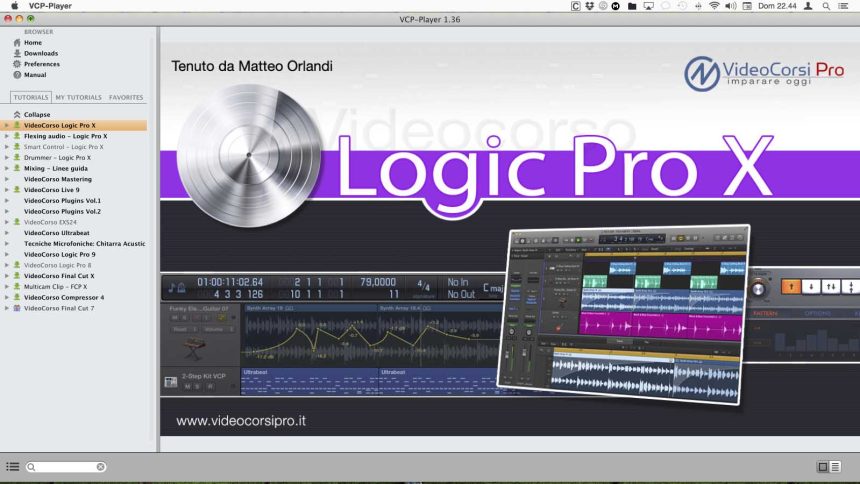
All Video Courses are available thanks to VCP Player, video player specially developed for OSX platform (from version 10.5 to current Yosemite) and Windows (compatible with XP, Vista, 7, 8 and 8.1). VCP-Player, at the time of writing to version 1.36, gives the user total control not only of video playback, but also of the download of courses or specific chapters.
Structured on three areas of instinctive consultation, it provides for the possibility of creating a backup of the purchased videos (although the system takes into account what the purchases are made and leaves the user to download the videos again, if necessary), a manual of a few pages (in bottom the keyboard shortcuts), in case the user had difficulty using the player, a search engine, which personally I never needed to consult given the effective organization of all the titles. Some functions of the player, particularly appreciated, concern the possibility of creating gods marker on the chapters you are consulting or, on a more general level, mark your favorite chapters to find them later in a separate table.
The central area, the one dedicated to videos, contains the playback controls. All videos are in 720HD, but they are not encoded to be read by other players.
I must note that by enlarging the video to the maximum and keeping the list on the left open, the Player has horizontally breached my 24 ”monitor, hiding the far right part. Not bad, if we consider that the 3 areas are resizable at will as well as, at the bottom left, the icon next to the search window allows you to exclude the tutorial browser by centering the course view.
Another personal consideration concerns the fact that a version of the VCP-Player for tablets e smartphone, taking into account that now the life of almost all of us, operators and lovers of music programming, is quite mobile.

Free tutorial
To get a much more precise idea of the topics covered in the Video Courses, in the next articles we will focus on each of them, highlighting their strengths and weaknesses.
If, on the other hand, you do not want to wait for our content analysis, also because it involves many hours to view, you can download the VCP-Player to access the free tutorials related to each Video Course.
Another way is to consult the YouTube channel of VideoCorsi Pro starting from this link.
Keep in mind, however, that it is really a taste as you can also see from the introductory examples to some VideoCourses inserted below.
Good vision!
USEFUL NEWS
Producer: Matthew Orlandi
Sito: Video Courses Pro
Presentation of the Logic Pro X Video Course
Presentation of the Mastering Video Course
Presentation of the Logic Pro Video Course: Drummer and Drum Kit Designer.


