




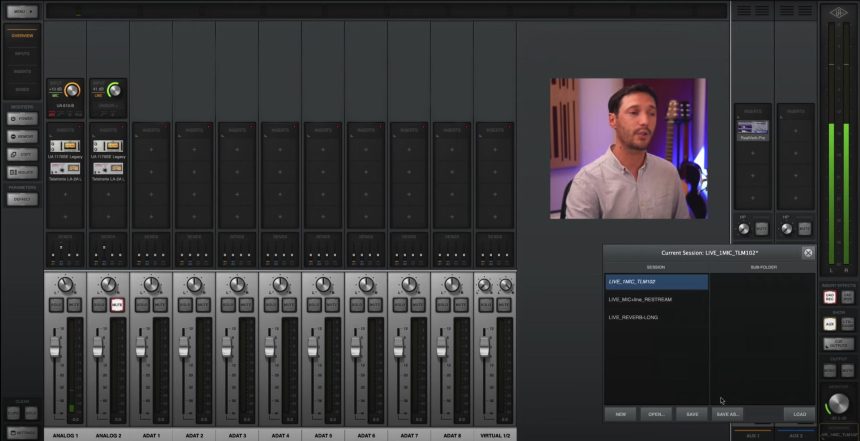
The advantage of having an Apollo audio interface is that it allows you to stream without using third party software with a few simple steps.
From the Console of UAD, via the matrix settings I, Apollo cards can be used to stream and / or be invited to online events without using loopbacks, soundflowers or similar. This ensures that you don't overload the cpu of your PC/MAC avoiding sending your audio with clip o sounds due to cpu overload since console plugins load UAD is managed by DSPShark inside the board.
To use the UA Apollo cards to stream via programs such as Viewer discretion, Restream.io, streamyard, you need to change channels 1 and 2 in the input action in the UAD console: "Settings -> IO Matrix”“ INPUT ”by setting channel 1 as MON L and channel 2 as MON R. By doing so, everything that is played in the MIX inside the console will be sent to the software we want. Obviously in the software we have to select our Universal Audio Apollo card as the audio interface.

This convenient solution works well as we can also save the settings of the settings on the IO Matrix and also of the session to save the channel strip used for live broadcast. If we are invited by another “Streamer” or we invite someone and we have to avoid re-sending the audio (usually the voice) coming from the live audio, we have to do a further sect on the IO Matrix.
We will use, for example, the AUX 2 channel in the console as an “output” to be sent for the live broadcast. To do this you have to go back to "Settings -> I Matrix “In the input section and change channel 1 to AUX 2R and channel 2 to AUX 2L. Then, from the console mixer, click on “sends” and raise the fader of the respective channels that we want to send to AUX 2. We can also decide the stereo positioning of the send.
Then, we will hear in the headphones the mix of the sound coming from the live and coming from our inputs, but in the direct will come only everything that is sent to AUX 2.


