




Raise the hand every stringed instrumentalist who has not at least once dreamed of using the sounds of a synth or a piano, but of having stopped for technical or practical complications.
Assembly of a hexaphonic pickup (???), interfacing with a sound expander and then tracking problems and so on. Forget all that, because Guitar to Midi will make you perfect guitarists-keyboardists!
We said ... but then what does it do MIDI GUITAR 2?

Transform what you play on the guitar into messages MIDI, allowing you to drive a keyboard, synth or just a plugin on your guitar PC/MAC
And it does it in a polyphonic way, so you can indulge yourself in playing the most complex things that come to mind, because MIDI GUITAR 2 will turn every single note into a sound on the keyboard.
The terrific thing is that the latency, that is the time it takes the software to understand what note you are playing and the sound from the keyboard, is really very low.
We have both plugin and standalone versions available, and for bass it is also available Bass To Midi, which as the name implies is the bass version.
Rack
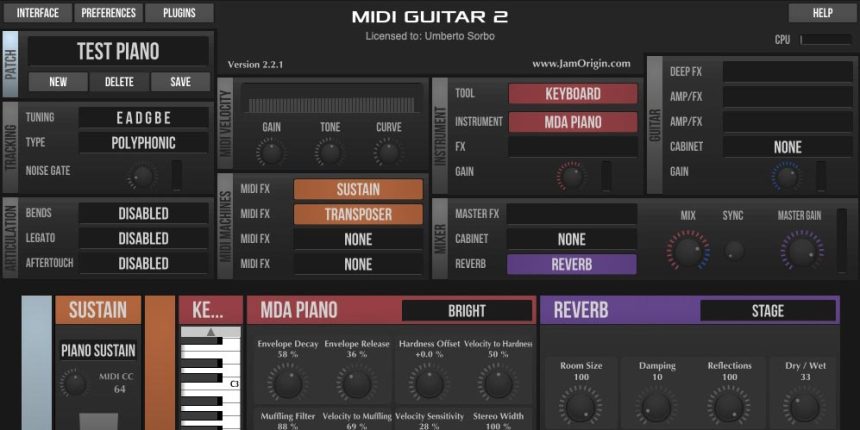
Everything comes in the form of a “rack”, that is a panel that contains all the plugins and settings we need for our final sound, because it will be possible to mix the guitar sound with the processed one.
Then the signal entering the audio interface, converted into MIDI messages that will go into the “Rack”.
Audio interface
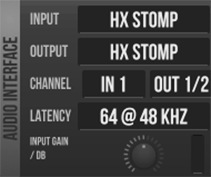
Here we are going to set the audio input from which our guitar comes and also the audio output. Also, you can set the signal latency, which value to choose will depend on the speed of your computer.
Finally, there is a potentiometer to set the gain of the input signal, which is essential for optimal tracking of the instrument signal.
Midi Out
If you don't use the plugin version, you can specify where to send the MIDI Guitar output, so we can use any MIDI port available on the PC (or MAC)
Patch

In the patch we are going to save the settings of all the panels to recall them later. It is possible to switch between patches using an external controller and using a MIDI Program Change
Tracking

This block transforms the audio signal into MIDI messages, there are few things to specify: tuning and tracking type (polyphonic)
Tuning
Various tunings are available and you can define your own.

Midi Velocity
In this panel we are going to adjust how the MIDI "notes" react to our playing, because although it will be the volume/tone input of our guitar to affect this parameter, here we can adjust the gain and tone in order to regulate the dynamics we want to obtain to the maximum.
A "curve”Which serves to compress or expand the dynamic range, so for example to make notes that sound louder are softer.
Articulation
In this panel we can specify whether or not to enable 3 parameters: bend, bound e aftertouch. For the legato we can also specify the type of sustain (if desired) which can vary from 5 milliseconds a infinite (WOW).
Midi Machines
Let's see them as MIDI "processors" to be added, so for example a note transposer, an arpeggiator, harmonizer, etc. .. You can add up to 4 and are set serious.
Note the possibility of creating custom ones with an editor that Guitar to Midi makes available (it is programmed in LUA).
Instrument
In this panel you select a tool, a synth or VST. It is possible to add an effect (Delay, Chorus or third party always via VST). You can select a “tool” which can be a polyphonic tuner, a chord wheel, wave or MIDI monitor.
Guitar
In this block you can select a tube amp simulator. There are many simulations available and it is also possible to upload third party IRs.
Mixer
Here the sound from the instrument and the module is mixed Guitar. With the knob Sync you can add a little delay between the two to adjust the latency of the Instrument part.
MIDI Guitar has a convolution reverb to which once again we can upload third party IRs.
master gain instead it is used to adjust the final audio output level.
Test setups
My test setup tried to put Jam Origin in a pretty awkward condition. I used an ultrabook Chuwi HI 10 Pro to understand if the software was able to maintain its performance.
As audio input I used a Hx Stomp Line6 for which it was necessary to use Asio4All, as the Windows version of the software only supports ASIO drivers (the Mac version does not need ASIO).

Nevertheless Guitar to Midi behaves in an excellent way and with great stability, both using virtual instruments and sending MIDI notes externally (in my setup Yamaha Motif XS). I only noticed overloads when I activated effects o amp, here you probably need a more powerful PX than the one I used for my test.
The software version Bass to Midi offers only one type tracking monophonic.
Conclusions
Guitar to Midi is a software that does what it should without any problem: from guitar audio to MIDI in real time and without latency.
If you are not going to use a hexaphonic pickup with its module, perhaps represents one of the best solutions PC based.
With a low price (about $ 100) and excellent support (dedicated forum) Midi to Guitar is a really interesting and valid product.
Useful Information
Sito: JamOrigin
Hands up every string player who has not at least once dreamed of using the sounds of a synth or piano, but of having stopped due to technical complications or anyway practical ones.
Assembly of an hexaphonic pickup (???), interfacing with a sound expander and then tracking problems and more. Forget all this, because Guitar to Midi will make you perfect guitarist-keyboardists!
We were saying but then what does MIDI GUITAR 2 do?
It turns what you play on the guitar into MIDI messages, allowing you to drive a keyboard, a synth or just a PC/MAC plugin with your guitar.
And it does it in a polyphonic way, so you can play around with the most complex things that come to mind, because MIDI GUITAR 2 will transform every single note into a sound on the keyboard.
The terrifying thing is that the latency, that is the time it takes the software to understand what note you are playing and the sound from the keyboard, is really very low.
We have both a plug-in and a standalone version available, and Bass To Midi is available for the bass, which as the name implies is the bass version.
Rack
Everything comes in the form of a “rack”, which is a panel that contains all the plugins and settings that we need for our final sound, because it will be possible to mix the guitar sound with the processed one.
Then the input signal to the audio interface, converted into MIDI messages that will go to the “Rack”.
Audio interface
Here we go to set the audio input from which our guitar comes and also the audio output. Also, you can set the latency of the signal, which value to choose will depend on the speed of your computer.
Finally, there is a potentiometer to set the gain of the input signal, which is essential for optimal tracking of the instrument signal.
Midi Out
If you do not use the plugin version, you can specify where to send the MIDI Guitar output, so we can use any MIDI port available on the PC (or on the MAC)
Patch
In the patch we are going to save the settings of all the panels to recall them later. It is possible to switch between patches using an external controller and using a MIDI Program Change
Tracking
This block transforms the audio signal into MIDI messages, there are few things to specify: tuning and type of tracking (polyphonic)
Tuning
Various tunings are available and it is possible to define your own.
Midi Velocity
In this panel we are going to adjust how the MIDI “notes” react to our way of playing, because although it will be the volume/tone of our guitar's input that influences this parameter, here we can adjust gain and tone so as to regulate the dynamics to the maximum we want to get.
A “curves” knob is also available that serves to compress or expand the dynamic range, so for example make sure that the notes that sound loud are softer.
Articulation
In this panel we can specify whether to enable 3 parameters: bend, legate and aftertouch. For the legate we can also specify the type of sustain (if desired) which can vary from 5 milliseconds to infinity (WOW).
Midi Machines
Let's see them as MIDI “processors” to add, so for example a note transposer, an arpeggiator, harmonizer, etc.
Up to 4 can be added and they are put in series.
Note the possibility of creating custom processors with an editor that Guitar to Midi makes available (programmed in LUA).
Instrument
In this panel you select an instrument, a synth or a VST. You can add an effect (Delay, Chorus or third party always via VST). You can select a “tool” which can be a polyphonic tuner, a chord wheel, wave or MIDI monitor.
Guitar
In this block it is possible to select a tube amp simulator. Many simulations are available and you can also upload third-party IR.
Mixer
Here the sound coming from the instrument and the Guitar module is mixed. With the Sync knob you can add a small delay between the two to adjust the latency of the Instrument part.
MIDI Guitar has a convolution reverb engine which we can once again load third-party IR.
Master Gain instead serves to adjust the final audio output level.
Test setups
My test setup tried to put Jam Origin in a rather uncomfortable condition. I used a Chuwi HI 10 Pro ultrabook to see if the software could maintain its performance.
As audio input I used an Hx Stomp Line6 for which it was necessary to use Asio4All, as the software version for Windows only supports ASIO drivers (the Mac version does not need ASIO).
Nonetheless Guitar to Midi behaves in an excellent manner and with great stability, both using virtual instruments and sending MIDI notes externally (in my Yamaha Motif XS setup). I noticed overloading only when I activated effects or amps, here you probably need a more powerful PC than the one I used for my test.
The Bass to Midi software version offers only monophonic tracking.
Conclusion
Guitar to Midi is a software that does what it needs without any problem: from guitar audio to MIDI in real time and without latency.
If you do not intend to use a hexaphonic pickup with a corresponding module, it is perhaps one of the best PC based solutions.
With a low price (around 100 dollars) and excellent support (dedicated forum) Midi to Guitar is a really interesting and valid product.


