





Vestax, a Japanese company, began in 1977 by designing and building electric guitars. In the 80s it introduced a series of multitrack tapes to the market to challenge products already established on the market such as Fostex, Yamaha and Tascam. Until today, it has continued to evolve and establish itself in the field of mixers and turntables for DJs, so much so that it has become the favorite of international DJs such as Carl Cox, DJ QBert and Cut Chemist, belonging to the Hip Hop DJ community. Obviously the latest production news from Vestax, always in step with the times, are the DJ MIDI Controllers that are popular on the music market. Today we will try the Vestax - Typhoon in all its functions.
Description
The Typhoon is an all-in-one MIDI controller from Vestax. This is the controller that all DJs select - even beginners - would like to have with them. In fact, the Typhoon allows you to manipulate and mix audio files directly from your notebook.
First impression
Taken out of the box, the Typhoon is rather compact: the dimensions are not excessive, so it is easily transportable (we are talking about 35,56 cm x 24,13 cm, for a weight of 1,5 kg). Aesthetically it has an attractive design: the first thing that catches the eye are the shiny metal jog wheels; the console has a smooth and shiny plastic texture on the top that mimics a carbon fiber look (it almost looks like a racing design), while the rest of the controller is made of rigid plastic and the various knobs and sliders are metallic red (Fig.1). The controls and the various buttons are made of white rigid rubber and light up in various colors when pressed, depending on the function (Fig.1b) - this also to facilitate the work of the DJ in the dark!


The Typhoon's controls are systematically arranged and, at first glance, everything seems to be under control. In the box, in addition to the Vestax controller, we find a user manual in English, driver software for Microsoft Windows XP / Vista and Seven operating systems, licensed Native Instruments Traktor LE (which is nothing more than the software to interface the controller with the PC / Mac) and a supplied USB cable for connecting the peripheral (Fig.2).

The Controller
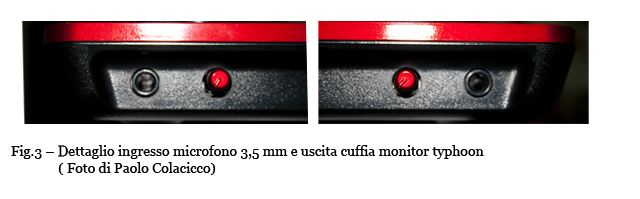
Let's start by describing the inputs and outputs of this all-in-one controller. On the front we find on the left a 3,5 mm microphone input with volume adjustment and, on the right, a monitor output for headphones (Fig.3) from 3,5 mm with volume adjustment. On the back of the controller (Fig.4) we find a USB output and a direct RCA output (Master Out) where active speakers or a linear amplifier will be connected directly.

The Typhoon has a self-contained internal sound card, so you don't need to buy or carry an additional audio device with you. The actual manipulation of the tracks - and therefore the control - takes place via the jog wheels (Fig.5), in my opinion very resistant, of standard size compared to other controllers on the market, very sensitive to the touch. The wonderful thing is that this sensitivity can be controlled via two knobs (Fig.6) (Touch Sensor Level) located on the back of the controller, then left and right jog wheels, which, separately, can increase or decrease touch sensitivity according to your needs. Also, to understand if we are really touching the jog wheel, the transparent plastic at the edges of the disc changes from blue (passive) to red (active). Immediately below the jog wheels we find the PLAY / CUE / CUP buttons.

With PLAY we give the start / stop command to the track (Fig.7), with CUE and CUP we control the track making it restart from the point or segment we have chosen, also with the LOOP SET function, putting it on pause or sending it to Play from that position. Furthermore, with the +/- buttons we can increase or decrease the portion of the loop to be repeated (Fig 8).


An important part of the peripheral not to be underestimated are the fader lines with the cross fader, the latter in my opinion not very convincing in terms of mechanical resistance: it seems - together with the faders - more suitable for a quiet DJ set, where the DJ mixes his songs in total tranquility without virtuosity, scratches and various acrobatics. Moreover, none of the three controls (Fig.9) has the curve cut to adjust the opening or closing of the channel. Immediately above the faders we find two other functions: FILTER / PHONE (Fig.10).

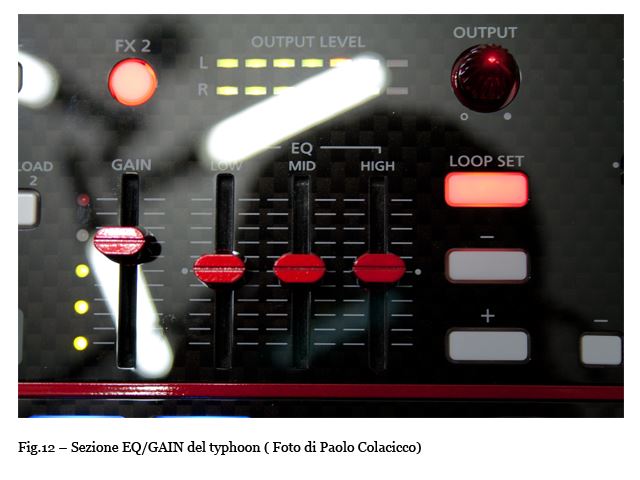
 Activating the FILTER button, a "low pass filter" or a "high pass filter" effect is applied to the track playing on that channel: the filter can be adjusted by turning the jogwheel counterclockwise - for a low pass filter - and clockwise - for a high pass filter. The PHONE key (symbol of an easily identifiable pair of headphones) is used to easily activate and deactivate the monitoring of the track to be mixed with headphones and, if necessary, to beat. In the upper corners instead, we have on both sides, therefore for channels A and B, sliders that give us the possibility to adjust and pit the speed / percentage of the time for the beating of the songs and immediately below we find the key SYNC with +/- indicators that are used for a more accurate adjustment of the BPM and therefore of the beat matching (Fig.11). In the upper central part of the MIDI controller, a pair of equalizers (one for each channel) with three LOW / MID / HI bands flanked by the GAIN of the corresponding channel do not go unnoticed (Fig.12).
The Typhoon allows us, without fiddling with our laptop, to easily change track and select the next one - or better yet to load it on the corresponding A / B track with a simple press. In fact, positioned at the top, we find a cross (Fig.13) which reminds us a little of that of Joypads for videogames: by keeping the SONG LIST key pressed, the list is scrolled on the display of our laptop and the track is loaded, selecting right or left depending on the channel. In the upper part we find the GAIN which adjusts the master volume of the entire console (Fig.14) and the FX1 / FX2 keys which activate the effects preset in the software (DELAY / FLANGER / FILTER) with the possibility of deciding how much effect to give or not to the track using the DRY / WET potentiometers (Fig.15).

Proof
The Typhoon Vestax has been tested, as mentioned before, on two different laptops, with different processors: the first with an Intel Centrino Duo T2500 2,0 Ghz, 2 Gb of ram and Microsoft Windows 7 operating system, with which presented no problems during installation (the software used was not the one supplied, but a more complete version of Native Instruments, Traktor Scratch PRO) (Fig 15).

The device was recognized immediately by the software, but unfortunately I found a latency of 22 ms in the commands, however very acceptable. The situation changes with an Intel Core 2 duo 2Ghz processor, 2 Gb of ram and Mac OS X operating system: the software used - i.e. the one supplied, Traktor LE - gave a regular latency of 13 ms and therefore easily manageable. I tried on both of them to force the audio latency in the audio section of the software, bringing it to 11,5 ms, obtaining excellent results in performance (Fig.16).
Considerations
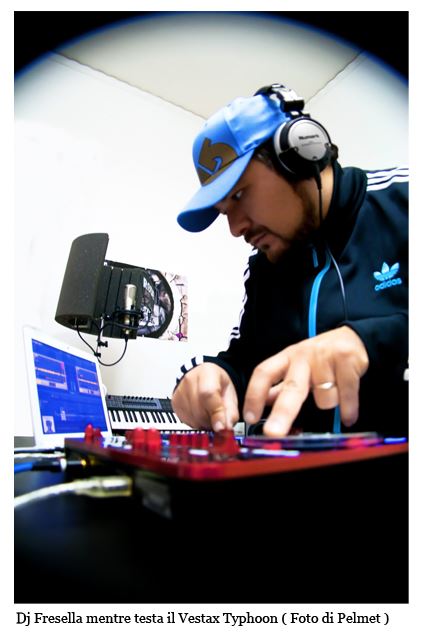
This product is definitely recommended for those who want to start understanding how it works and, therefore, become familiar with these controllers by spending little. Personally, I would not recommend this console to anyone who wants to experience the thrill of scratching, as they would be deeply disappointed due to the fader delays and latency issues mentioned above. On the other hand it is a perfect product for Dj selecta evenings, indeed very simple to use and easily tamed. Moving from one room to another with a simple controller and a laptop makes the work of DJs a lot easier and the Vestax engineers know it, but don't overdo it!
the next Dj Fresella!
Pro:
Excellent Q / P ratio
All-in-one, integrated sound card
USB powered
Easy installation
Great for mixing (very accurate)
Against:
Currently not compatible with all CPUs
Structure and mechanics not very resistant
Not suitable for scratching due to audio latency reasons
Lacks adjustment and trimming of the fader curve
Extra:
The instrument in question has, at the moment, a weak point: the slight latency of the sound card, which does not allow you to do scratches of a certain level (I am obviously talking about the execution speed, used for some musical genres). Yet, it cannot be defined as an entry level product to be abandoned if this type of performance is desired in the future. Nothing could be simpler, if the drivers are not updated satisfactorily, just buy any external sound card with low latency to use it together with our controller.
USEFUL INFORMATION:
Producer: vestax
Model: Typhoon
Website: http://www.vestax.com/
Italian distributor: www.exhibo.it
Cost: about 260 / 280 euro


