For some time now, software houses mainly dedicated to the development of effects plug-ins, with which they have achieved notoriety for the quality and efficiency of their products, have been trying their hand at developing new concept synthesizers (this is the case, for example, of Softube Parallels, reviewed here) or emulating past glories. Conversely, again in order to offer a complete park of "innovative" audio software, companies such as Arturia, after years spent developing Synth emulations, are approaching the development of effects emulations (3 Compressors).
Regarding the first case, this time it is the turn of the Brainworx, affiliated with what we could define as the consortium "PlugIn Alliance”, Known to producers all over the world not only for their own FX, almost all of proprietary design, but also for having contributed to the development of some effects algorithms for the platform UAD.
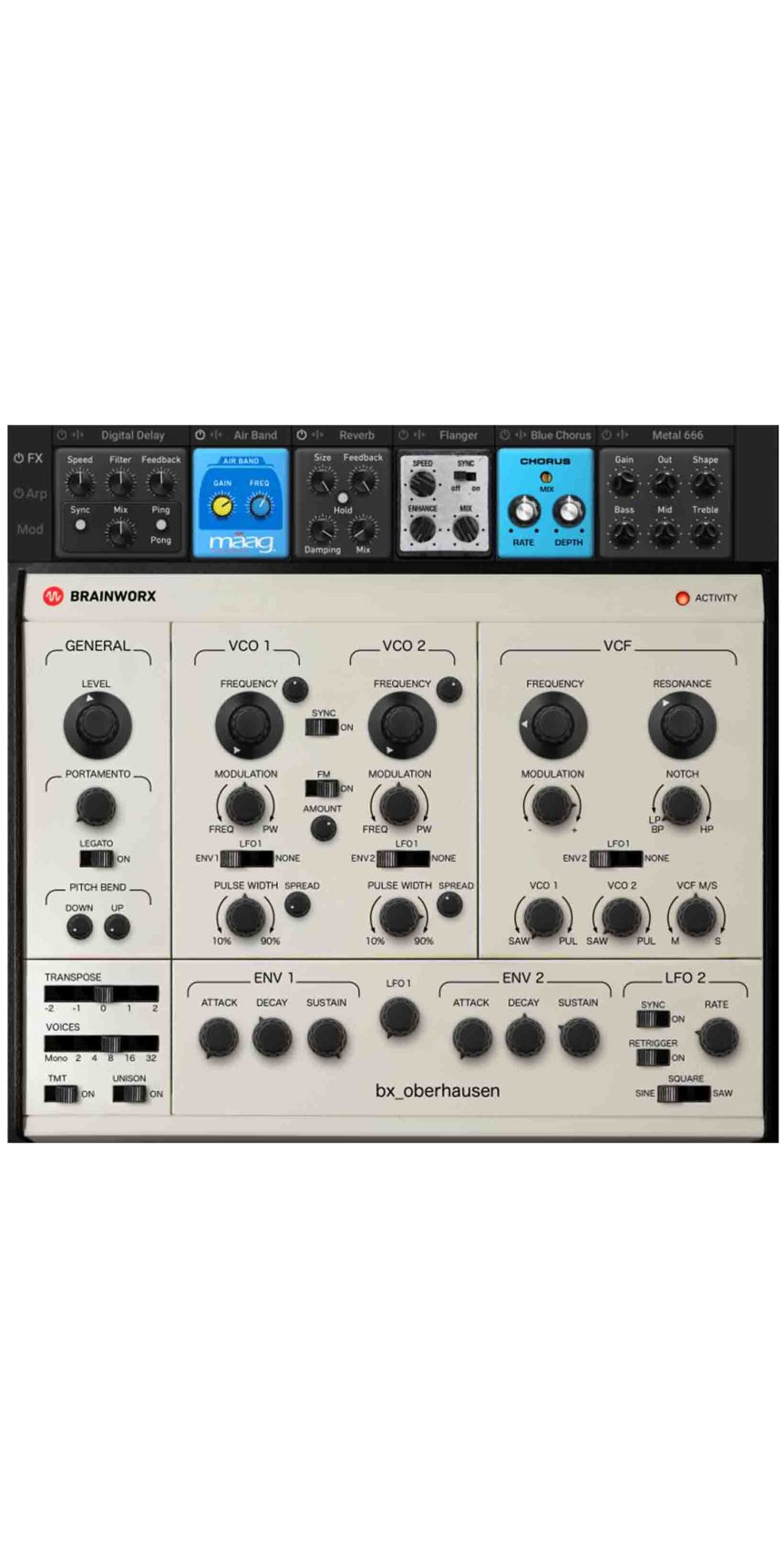
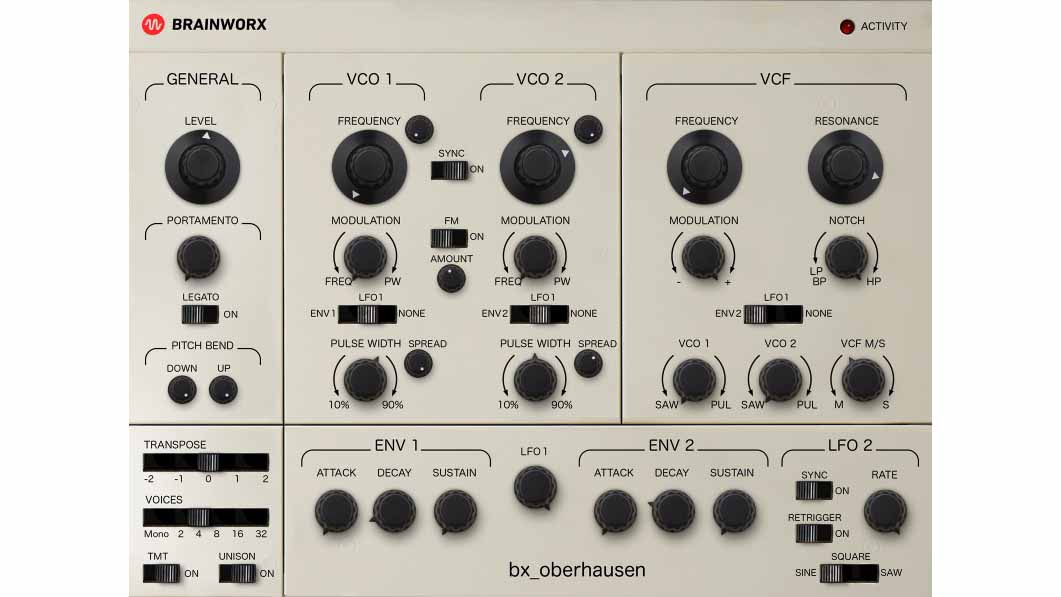
Il BX OBERHAUSEN, it can be guessed from the image of the main GUI (Fig. 1), winks at a glory of the past like the Oberheim SEM, from which, however, it detaches itself, adding some programming feats that make this "new entry ”As something to listen to and, why not, use at least for the period of use made available by demo version (14 days with iLok authorization, but without the need to possess the key, as you can authorize the computer itself, after registering on the specific site.
GUI
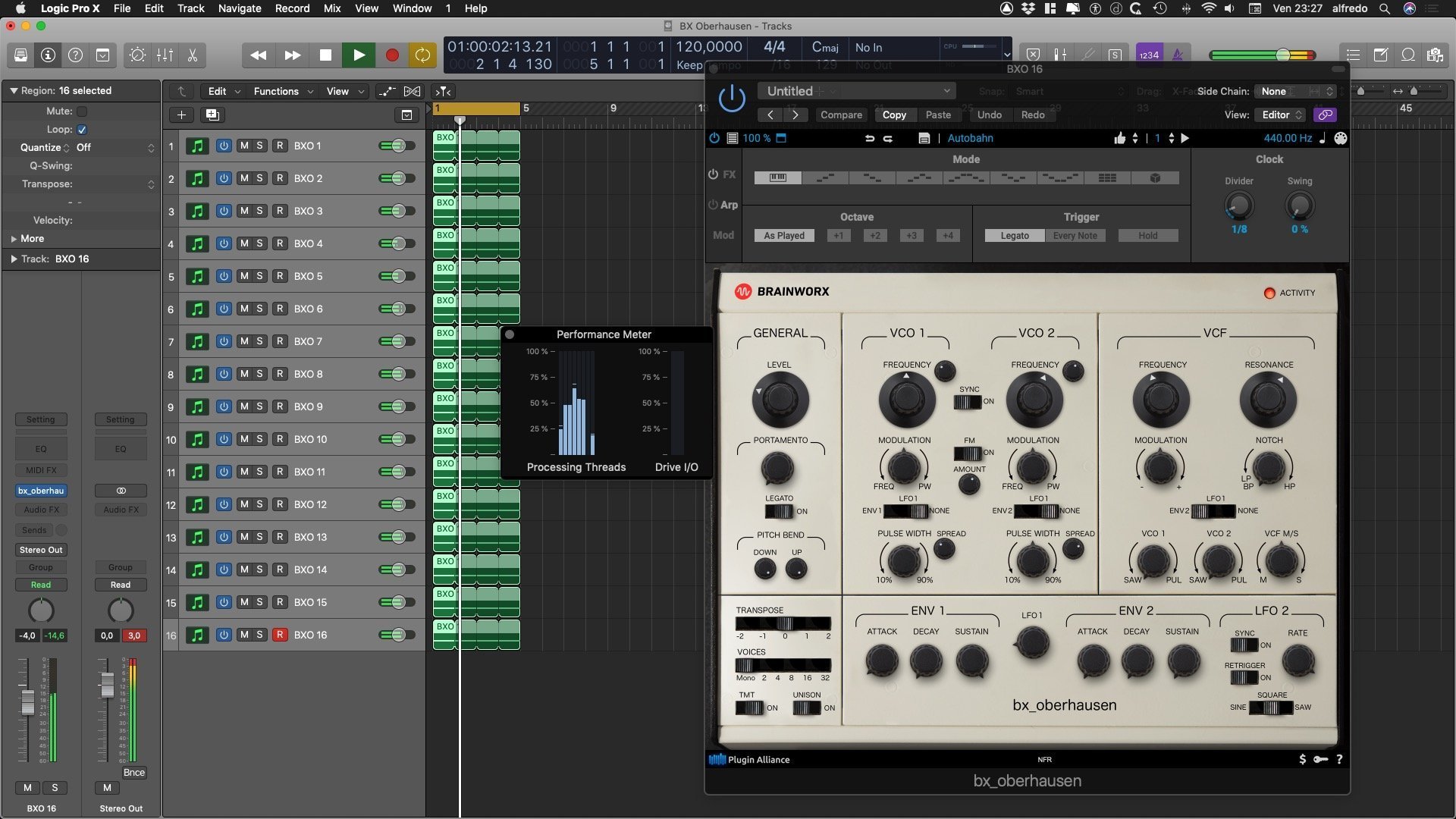
The main interface of BX OBERHAUSEN (hereinafter referred to as BX extension) almost completely follows that of the hardware SEM. All processing takes place on an algorithmic basis and, therefore, without the presence of samples. The load on the CPU, considering the MacMini Quad i7 2,3GHz of 2012, on which the test was carried out, is more than acceptable when compared to other modern software tools (Fig. 2).
A series of specific parameters and some additional sub-pages, mean that the Synth, in addition to analog emulation, can also enter new sound and characterizing environments.
Excluding the main GUI, therefore, there are 4 other sides available on which to intervene in different ways: Effects, Arpeggiator, Modulations, Preset Management.
All the sections, including the MIDI Learn of the parameters, can be reached in the Tool Bar, located at the top of the interface, which collects the following operating icons from left to right:
- On / Off of the plug.in separate from that of the host DAW;
- Preset Management (see dedicated paragraph);
- Zoom: in this regard it must be said that there are 5 fixed dimensions expressed as a percentage (50, 75, 100, 125, 150), in order to adapt the window to different monitor resolutions. However, 125% and 150% are only available for the synthesis facade: if you try to activate Modulations, Arpeggiator or Effects, the size automatically scales to 100%. Everything is regular, however, if the other two minor resolutions are used;
- Icon for opening the 3 additional programming sections: FX, Arp, Mod;
- 2 icons dedicated to Undo / Redo programming up to a maximum of 32 “historical” steps;
- Icon for storing a new Preset, or the Overwrite of the selected one;
- Drop-down menu, different from Preset Management, for the selection of Presets with a lot of Thumbs Up to annotate the Favorites (there is a dedicated folder ... see Video) and the progressive unitary selection of the same forward or backward: excellent !;
- Number of Beats and Play / Stop: allow the sequential and automatic selection of the Presets belonging to the same category, while you are intent on playing, without having to leave the keyboard and select them progressively.
- General instrument frequency variable between 420 and 460 Hz. By default, of course, it is 440;
- The SemiMinima indicates the Panic button with which the synth is immediately put into Mute, as a consequence of the fact that all active notes are returned to the Note Off state;
- Icon of the MIDI Connector, to activate the MIDI Learn of the parameters (see dedicated paragraph).
To complete the description of the general parameters, there are the 3 icons to list at the bottom right for: the purchase of the plug.in (dollar icon); the activation of the same (lkey-closed); a drop-down menu (the question mark) which refers to the manual, rather than to the download of the Updates, or to general info.
In the programming mode it must be considered that holding down the Alt, any parameter is reset to its default value, as well as it is possible to lock it on the desired value by right-clicking the mouse. In the case of macOS Mojave, with which the test was carried out, but I believe it is also valid for some previous macOS, the parameter values can also be varied with the scrolling of the Magic Mouse. This condition is also applicable to the general Frequency of the instrument.
In my opinion, the possibility with the double click of being able to insert a specific numerical value is missing.
GENERAL PARAMETERS and SUMMARY
The actual synthesizer, it was said, is an emulation of theOberheim SEM (Synthesizer Expander Module) of the 70s. Strictly monophonic, the original SEM could be "reconfigured" by purchasing more modules to obtain a biphonic, or a 4-voice, or, for those who could afford it, an 8-voice. A few years ago, in 2011, --Tom Oberheim has redesigned the SEM by adding a MIDI to CV system, to adapt it to the new modular needs (Eurorack docet!) (Fig. 3).
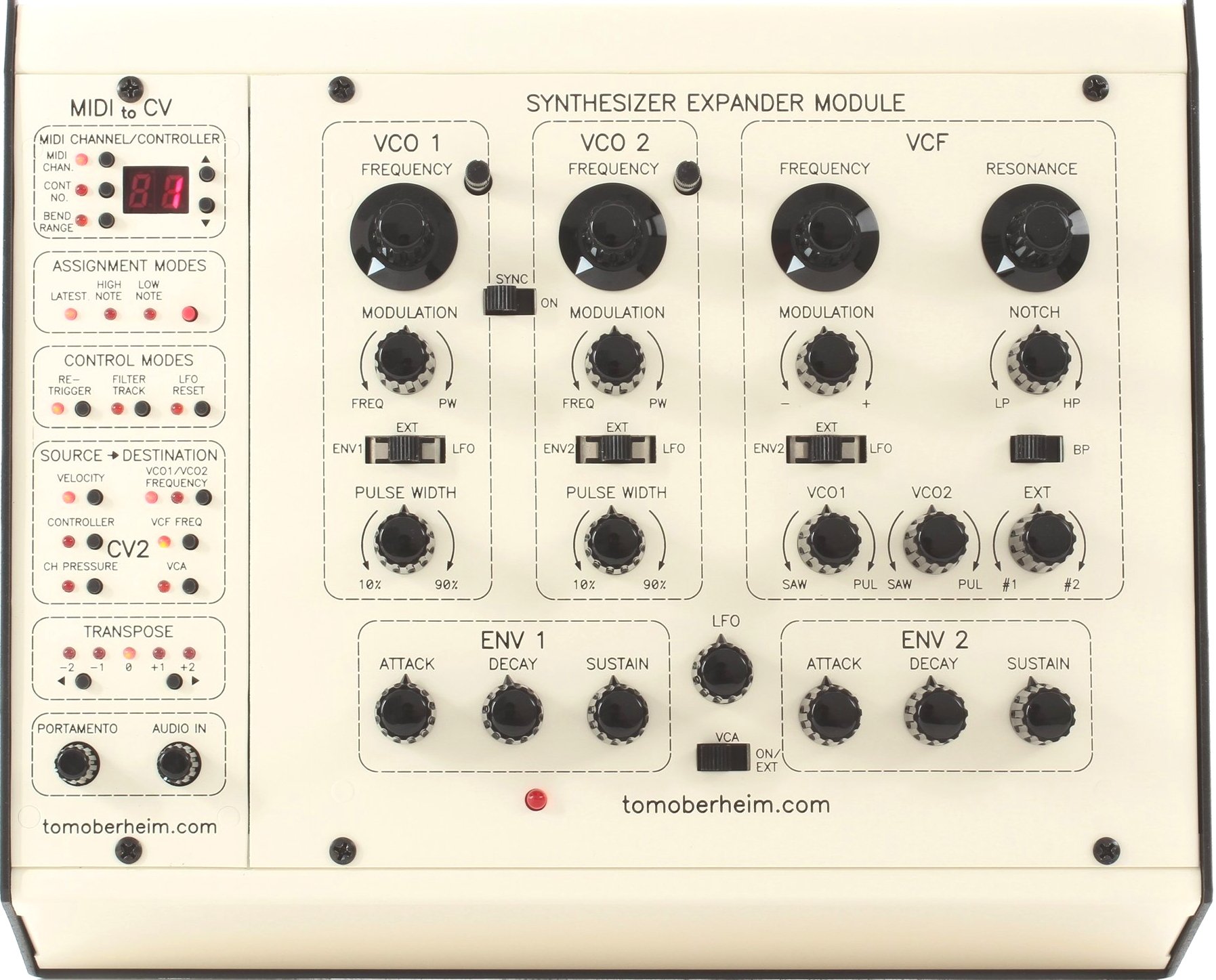
The SEM synthesis scheme foresees the “classic” chain with 2 VCO, VCF and VCA, modulated with 2 Envelopes and an LFO.
Exciters
In both cases, we are dealing with an almost identical main synthesis structure (Fig. 4). The SEM, and hence also the BXO, is structured on a double, identical Oscillator. The same relative parameters, from top to bottom, concern:
- Tuning by semitones (+/- 24) and hundredths of a semitone (+/- 100). In the case of the original SEM they are superimposed on each other; in the case of the BXO, one acts on the two concurrent potentiometers;
- A switch for the Sync of the two Oscillators;
- Modulation of the Frequency (Vibrato) or of the symmetry of the pulse waveform (Pulse Width), with choice of the source through the switch below: LFO and ENV 1/2 for both. In the same switch, for the SEM the possibility of modulation through external signals, for the BXO simply the OFF. It should be noted that at 12 o'clock, there is no modulation effect and, as most experts know, the PW (symmetry) concerns only the impulse wave and not the SAW;
- Dedicated potentiometer to adjust the symmetry of the pulse waveform (10-> 90%).
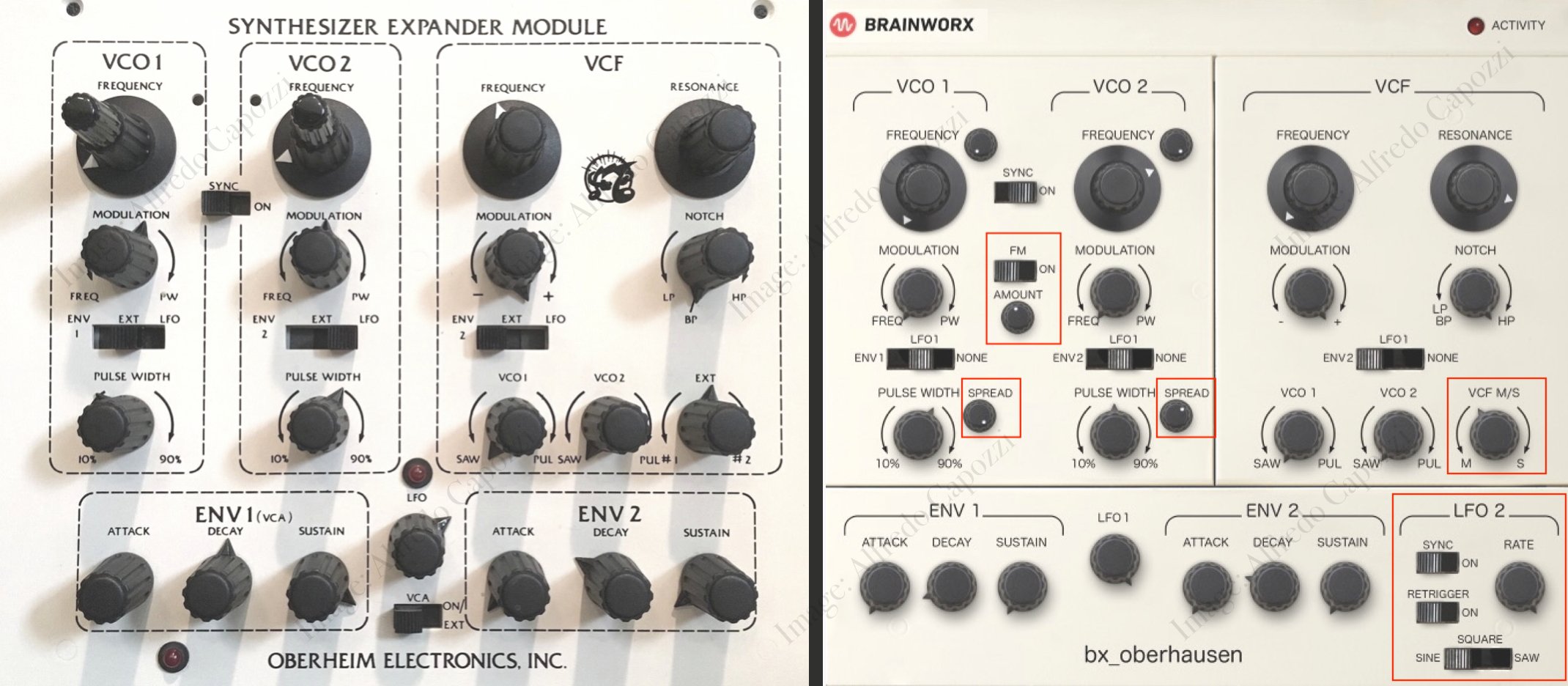
To these common parameters, the BXO adds:
- the “Spread” parameter, which affects the width / stereo positioning of the Oscillator and is influenced by the VCF M / S parameter present in the VCF section;
- The switch for the activation of the Frequency Modulation (FM) between the two oscillators and the relative potentiometer to dose the depth of action.
VCF
The Oberheim one, I remind young producers, is a variable state filter with a slope of 12dB / octave (2 poles). It can therefore be set as BPF (Band-Pass Filter) or, with seamless excursion, from an LPF to an HPF, passing through a Notch (Band Rejection). Compared to the equally iconic Ladder filter from Moog (LPF at 24dB / octave), it is less aggressive and more suitable for obtaining soft sounds, especially PAD, Thongs, Brass, ...
Also in this section we find practically the same parameters of the original SEM (Cutoff and Resonance, first of all, and the Modulation with LFO / ENV2 source selector, identical to the VCO2). The only exception is the SEM's EXT potentiometer (with which an external signal can be filtered by the module in question) replaced by the BXO's VCF M / S. The latter, by means of a Mid / Side processing of the input signal, allows us to send the central signal (potentiometer all the way to the left - M) or the side bands (potentiometer all the right - S) to the Filter. With the potentiometer at 12 o'clock, all the signal is sent to the filter, according to traditional use.
In this section there are also the two potentiometers for choosing the double waveform, Saw or Pulse, to be managed in percentage of volume. Attention: by positioning the potentiometer at 12 o'clock you do not get the mix of the two wave forms, but simply the silence of the Oscillator.
Envelopes and LFOs
The third and final section, common to the SEM and BXO, concerns the envelopes and the first LFO (unique in the SEM).
The envelope, as you can easily see from the image, is of the ADR type (Attack, Decay, Sustain) where the Decay also establishes the decay time of the Release. Also on the envelope, the Brainworx engineers have tried to respect the analog / hardware behavior of the original as much as possible: the manual, in English, reports in detail all the electronic characteristics of these parameters.
To the only LFO of the SEM (present only the Rate parameter, frequency, with fixed sinusoid), the BXO supports a second LFO with:
- choice of waveform (Sine, Square, Saw);
- Rate, for the playback frequency;
- Sync: to link it to the DAW;
- Retrigger: to define the beginning of the rotation phase if it should be subject to the action of the musical keyboard or not.
Master Section
Located on the left of the main screen, here too we find some interesting things not present on the original model.
From top to bottom, we find:
- the General Volume;
- Portamento, for the glided effect between two notes: it only works if you are in monophonic mode;
- Legato mode: if activated, makes Portamento work only if the two notes are played linked to each other.
- Pitch Bend: with separate Up / Down setting;
- Transpose: Octave transposition (+/- 2);
- Voice: to set the polyphony of up to 2 voices in multiples of 32. The monophonic mode is necessary if we want to use Portamento.
- Unison;
- TMT (Tolerance Modeling Technology): Brainworx proprietary technology, refers to the parameter with which the software house has tried to give the BXO the "detuning" of the voices, typical of analog instruments. By activating it, each voice of the BXO produces a sound with variations in frequencies and phases, as well as the same frequency response.
FX, ARPEGGIATOR and MODULATIONS
They can be reached with a click on the dedicated icon which, as mentioned at the beginning, is located in the “Tool bar” above the synth: the icon is the one beside, on the right, of the percentage.
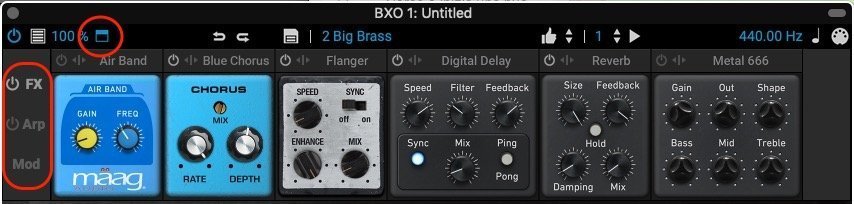
Once the section is open, on the left we find the three icons to call up each single section (Fig. 5). Effects and Arpeggiator have here the On / Off switch of the same section.
But, let's go specifically ...
Effects
Brainworx explains this explicitly in the manual: the 6 FX modules, Mäag AIR BAND, Blue Chorus, Flanger, Reverb, Delay and Metal666, simplifications of the most performing proprietary plugins should be considered, to which the essential parameters have been assigned to obtain appreciable results.
- Mäag AIR BAND: you can select 6 frequencies (2.5kHz, 5kHz, 10kHz, 15kHz, 20kHz, 40kHz) to boost with side by side Gain (values from 0 to 10, the equivalence in dB is not specified);
- Blue Chorus: Rate (frequency) e Depth (Depth) with values from 0 to 10, overridden by the parameter Mix for Wet / Dry, in percentage;
- Flanger: modeled on a pedal, it presents the parameter Speed, for the frequency, which can be "synced" to the DAW, and theAnd also to make the effect more evident. Also here, Mix regulates the Wet / Dry of the same;
- Reverbs: With Size e Feedback the desired environments are recreated;
- Delay: Delay: Speed adjust the time of the repetitions which, if desired, can be put in Sync with the DAW, with the appropriate button. Filter is the control to apply an LPF if you rotate counterclockwise, or an HPF if you do the opposite. Feedback check the amount of repetitions. The Ping Pong button activates the homonymous mode on the stereo front;
- Metal666: borrowed from one of the algorithms present in the more performing "bx_rockrack V3", it is an Amp Simulator that allows more or less aggressive interventions according to the use of Gain e Oct. Shape it acts like Knee, smoothing or not the intervention of the first two parameters. To complete the whole the EQ with interventions of Bass / Mid / Treble.
Arpeggiator
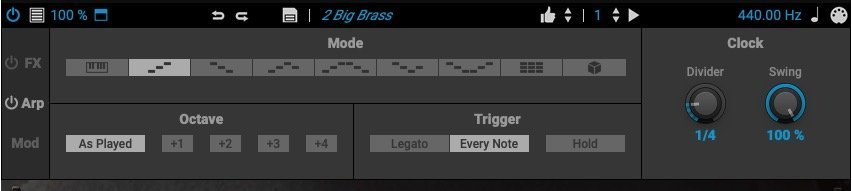
9 the modality that can be activated: As Played (ie it follows the natural execution of how the input notes arrive); Up, Down, Up & Down e Down & Up (with and without repetition of the last note); Chords e Random.
Octave: As Played (practically reproduces the notes played) + 1 / + 2 / + 3 / + 4: all feasible individually, so it is possible, for example, to jump two octaves by activating only +2 and +4 with and without As Played. Even 2 octave Master users will surely find the ideal solution to their performances / productions.
trigger: With Legato the arpeggiator follows the timing / clock set; with Every noteinstead, with each successive note played, the arpeggiator restarts playback. . allows you to add more and more notes, while maintaining the performance of those already played.
Clock: Divider sets the rhythmic grid of execution (possible values from 1/32 to 2/1, then from 1/32 to 1/2 both triplets and dotted): Swing, it needs no explanation, it expresses values on a percentage scale. (Fig.6)
Modulations
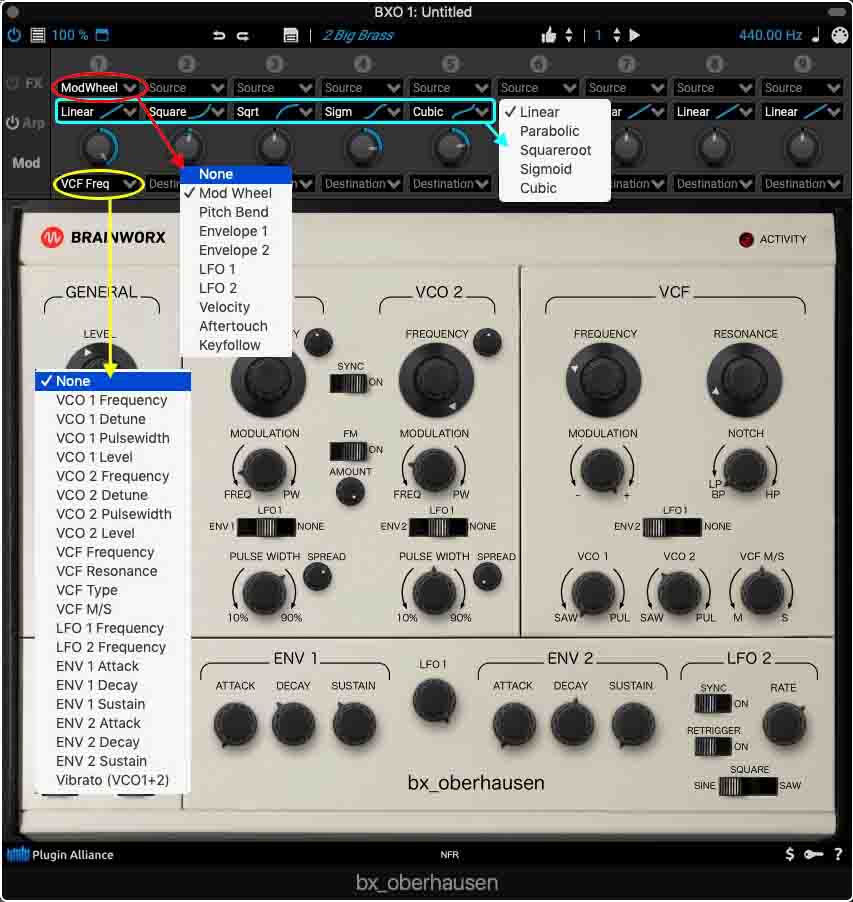
There are 9 modules, identical to each other, with 9 sources and 21 destinations (Fig. 7).
In addition to the specific Amount (depth of action which can be, in percentage, positive or negative), there is the possibility to choose between 5 functions that define the action curve.
If you take a look at the possibilities offered by the sources and destinations, it is clear that some limits of the main GUI can be easily overcome: from here you can make sure, for example, that the action of the LFO Frequency is controlled by the Modulation Wheel or, if the ENV 2 is busy modulating the VCO2, decide to use the ENV 1 to control the Filter.
PRESET MANAGEMENT
The specific window is activated by clicking on the icon placed in the Menu Bar before the 100% icon. The 350 Presets supplied are cataloged for Categories e Sub Category, first, but you can also filter them by Mode, Author, and Bank (3rd column) and are compatible with the system NKS extension (Nactivate Kuntroll System) Of the native instrument, therefore fully recallable by the masters of the German company and by the others that implement this system, now a standard: there is also the possibility of export / import of NKSF files. All Presets can also be associated with multiple Tags, and several are correlated with comments that help to understand if Control Change assignments are foreseen. There is the possibility of setting "Favorites”And recall them, subsequently, in a specific table, from the same window (see Video).
Quite particular in BXO, as already mentioned in the paragraph of the GUI, the possibility of being able to automatically listen to all the Presets or only the desired category. In the Menu Bar, you set the number of beats and with Play you make the Presets change by themselves. If a MIDI loop sequence is programmed, you can be comfortable listening to the whole selection without worrying about further selective clicks (Original idea, convenient and useful! Ed.). The number of beats is “synced” to the Bpm of the host DAW, but Play must be activated manually (see Video).
MIDI LEARN
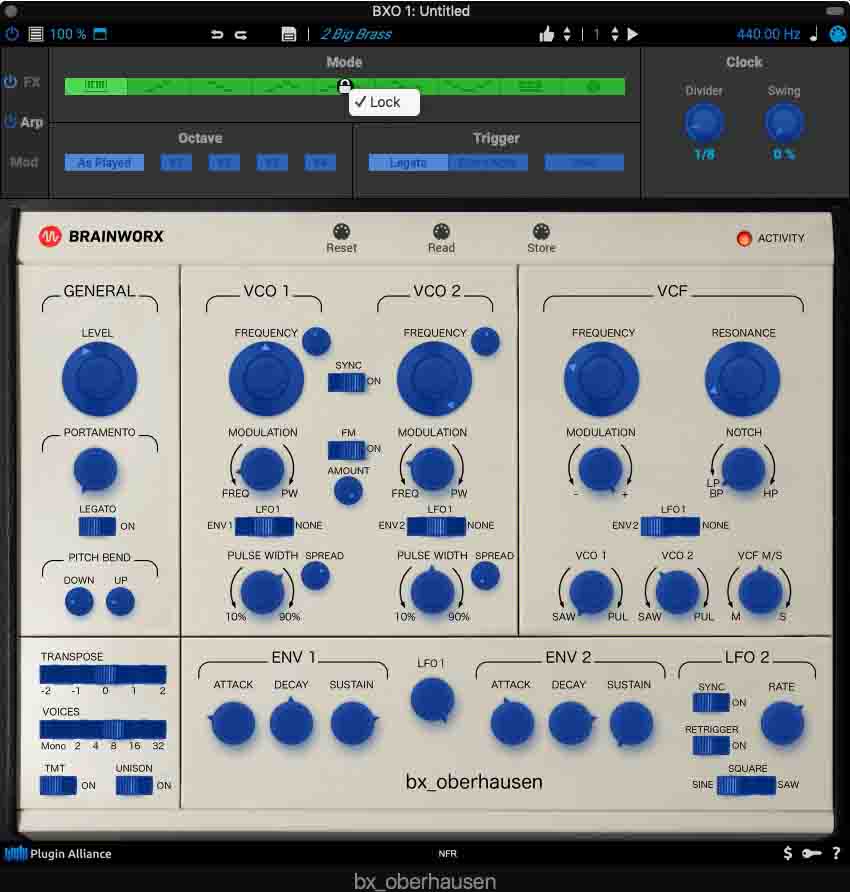
All, and I repeat, all the parameters of BXO, including those of the FX, the Arpeggiator and the Modulations themselves (???), can be linked to any controller via MIDI Learn and, if desired, be put in Lock, to avoid subsequent, incorrect, reprogramming (in this case, the parameter is highlighted with a green background, instead of wisteria). This, between the lines, not only allows you to set the most important parameters but, once this is done, you can also save and recall the programmed Setting (Fig. 8).
PROJECTED IMPACT
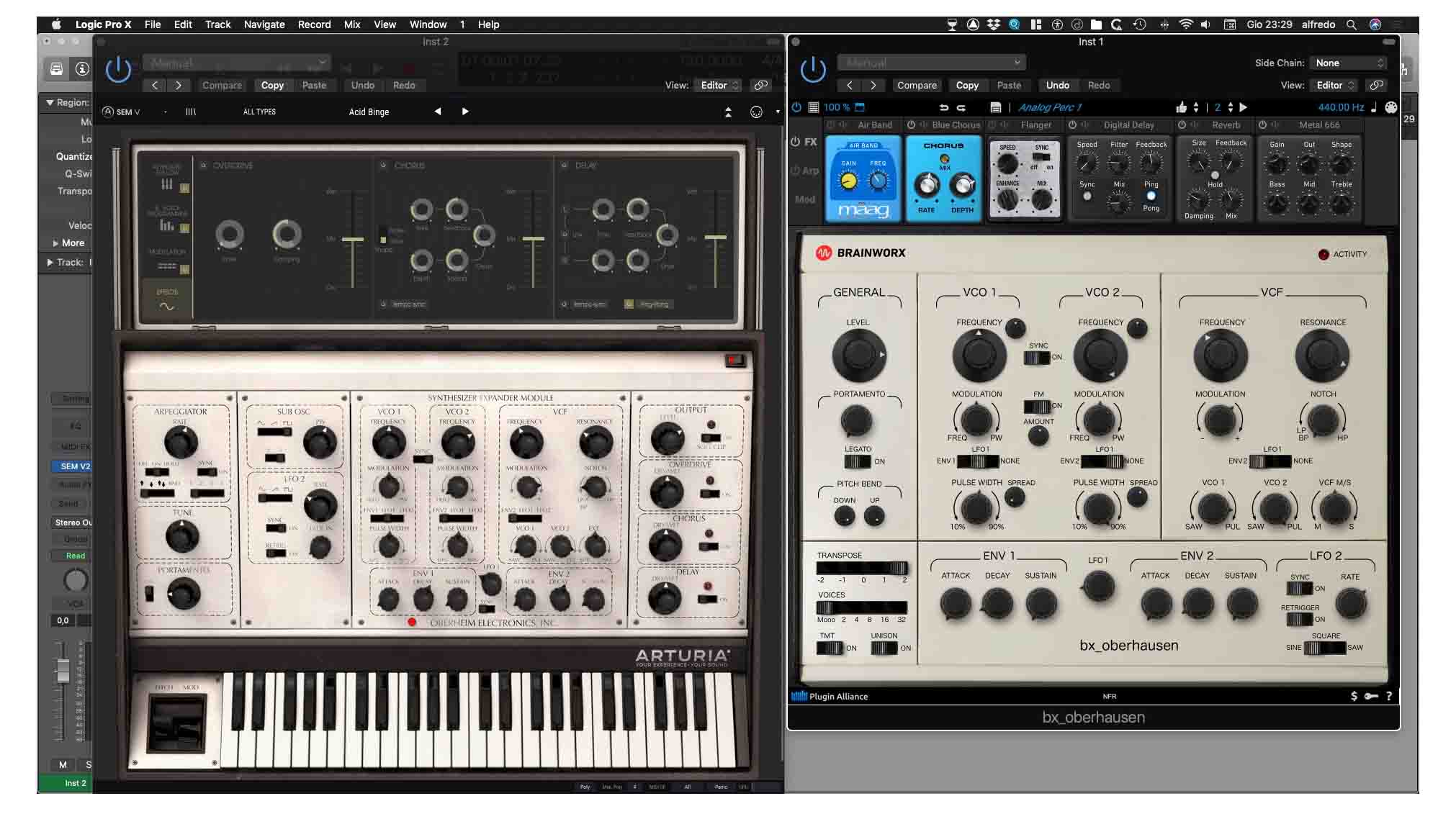
If you cannot afford the cost of the original SEM monophonic, in the current software landscape, at the moment, there are not many alternatives: if we consider modeling synths or you go to the BX_OBERHAUSEN or you look at the SEM V of the Arcturia which, as it is obvious, it has different prerogatives, including the global sound (Fig.9); if sampling synths convince you, then you can consider SAM, as a module of the Syntronik (Sampler Player by IK Multimedia, tested here).
Even if we are at the 1.0 release, the BXO is mature and with different arrows to its bow: from the possibility offered by Unison in combination with the TMT algorithm, to the Undo / Redo of programming, to the possibility of automatically listening to the Presets or, again, to the possibilities , not all conventional, offered by the use of MIDI Learn; not to overlook the more obvious but equally important things, such as the FM of the Oscillators or LFO2, not present in the original model, rather than the NKS compatibility. Last but not least, some technical info in the manual, only in English, describing the original SEM circuitry from which Brainworx took inspiration for the development of the algorithms.
The aspects that may have a margin for improvement are almost non-existent, to be counted more on the personal desire to nitpick rather than on design and overall performance discrepancies, such as the lack of being able to set precise parameter values with a double click on it.
To you, considering the professional cost, but calibrated to what the BXO offers, if you want to make it part of your synth parterre.
Good music!!!
PLUS 👍🏻
- Automation for listening to presets;
- TMT parameter, and Unison;
- M / S filter;
- Some technical info of the Manual.
MINUS 👎🏻
- the double click is missing to insert a precise value;
- professional cost.
BX OBERHAUSEN is available for all professional formats (AAX Native, AU, VST2, VST3), at a cost of $ 249,00 excluding VAT.
Alfred Capozzi